
Simple ERP System for Small Business: What to Fix First
A simple ERP system is one with few modules, five to twenty users, and a setup time measured in weeks, not months. It stays simple only when the process behind it is already clear and written down. Simplify the process first, then choose the lightest tool that covers it.
What Is the Simplest ERP System for a Small Business?
The simplest ERP system is the one with the fewest modules, the smallest number of user roles, and a setup time you can count in weeks, not months.
For a 5-50 person trading or manufacturing business in Hong Kong, Bangkok or Ho Chi Minh City, "simple" has three concrete markers.
Modules: it covers sales, purchase, stock and basic accounts. Not twenty modules you will never open.
Users: five to twenty logins, mapped to roles such as sales, store and accounts, not to every employee on the payroll.
Setup time: weeks, not months. If a vendor quotes six months to go live for a 15-person business, that is not a simple ERP system, whatever the brochure calls it.
This is the definition that matters when you are searching for erp for small business or sme erp: not the feature count, but how much of your actual working day runs through the system without a phone call to confirm something.
Most owners who search for a "simple" ERP have already been burned once. Either a previous tool was oversold as light and turned into an eighteen-month rollout, or a well-meaning IT hire bought something enterprise-grade for a ten-person team. The fix in both cases is the same: define simple by what your team actually does each day, not by what the sales deck promises.
Why Fix the Process Before You Choose the Software?
A simple ERP system only stays simple if the process it runs is already clear. If the process is messy, the software copies the mess and runs it faster.
Take a trading company importing finished goods. Sales raises an order. It goes to accounts for a credit check, usually over WhatsApp. The warehouse checks stock manually. Dispatch waits for someone to confirm the payment has cleared. Nobody wrote down who approves credit, or what information that decision actually needs.
This is not a software gap. It is an undocumented decision point. Buying an ERP here will not fix the delay. It will just give the delay a login screen, and a monthly subscription to go with it.
Do not automate a bad process. Before you look at any tool, write down who places the order, who approves it, what information that approval needs, and where the delay actually happens today. Sit with the person who does the job, not just the manager who describes it, because the two accounts rarely match.
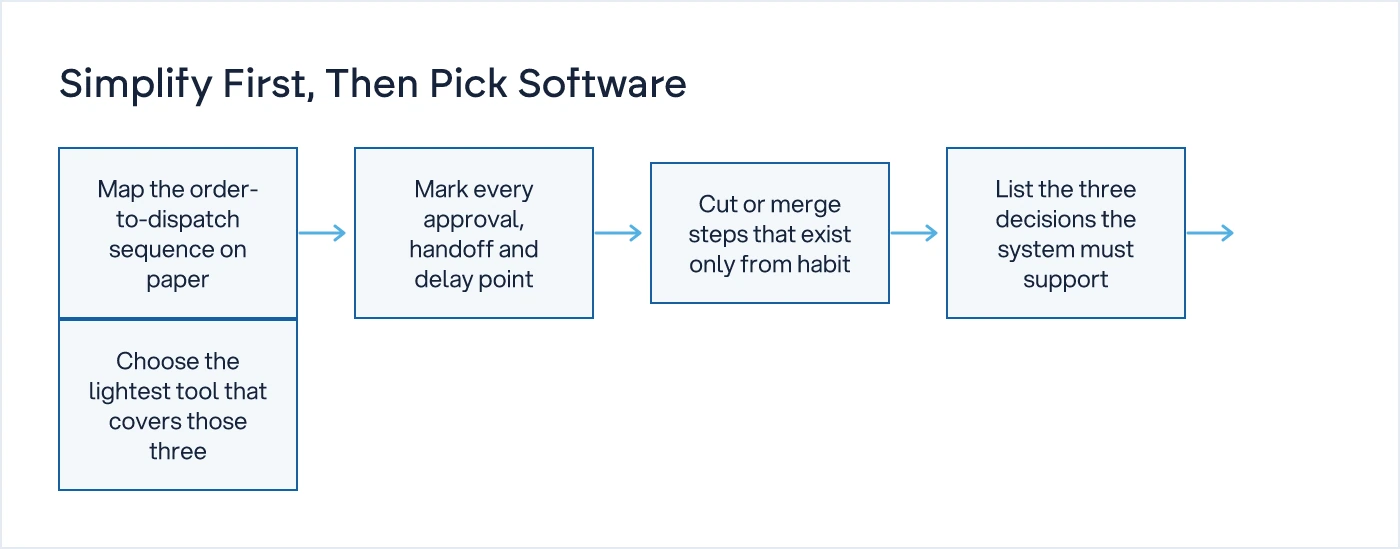
Once this is on paper, half the "must-have" features on your original wish list usually disappear. A credit-check approval that used to need three people and a WhatsApp thread often collapses into one rule: orders under a certain value clear automatically, anything above goes to one named person. The tool choice gets easier because the requirement list gets shorter and truer.
This exercise also tells you something a vendor demo never will: whether the delay you are trying to fix is a software problem at all. Sometimes the real issue is that two people both think they own the same approval, and no software in the world fixes that until someone decides who actually does.
What's the Difference Between Cloud ERP and SaaS ERP for an SME?
Cloud based ERP means your data and software sit on someone else's servers, reached over the internet instead of a server in your own office. SaaS ERP is the commercial model built on top of that: you pay a monthly subscription per user instead of buying a licence and hosting it yourself.
The advantages for a small team are straightforward. No server to maintain. Access from more than one site, useful if you have a sales office in Hong Kong and a factory in Vietnam. Updates are handled by the vendor. Lower cost to start, since there is no server to buy and no IT person needed to keep it alive.
The trade-offs are real too. The subscription runs forever, unlike a one-time licence, so a tool that looks cheap at twenty users a year can cost more than an on-premise licence by year four. You depend on your internet connection, which matters if your warehouse has patchy coverage. Your data sits outside your building, so ask the vendor directly where it is hosted, how backups work, and what happens to your data if you cancel. Check this with your IT advisor and, where relevant, your local data protection authority before you sign.
For a business with one or two locations and a dozen users, cloud ERP removes an IT burden a five-person team was never going to carry well anyway. That is largely why searches for "cloud based erp" and "saas erp" are climbing across Hong Kong: fewer businesses want to own and patch a server, and fewer can justify hiring someone just to do it.
The decision on cloud versus on-premise sits with whoever is accountable for data if the vendor goes out of business or a renewal lapses, usually the owner or finance head, not whoever ran the product demo.
What Should You Treat as Must-Have vs Nice-to-Have?
Most SMEs need four things working cleanly. Everything else is a comfort feature you can add once those four are solid, or skip entirely.
| Capability | Must-have | Nice-to-have |
|---|---|---|
| Stock visibility | Single view of stock across all locations | Barcode scanning on every bin |
| Sales flow | Order to invoice without re-entry | Customer portal for order tracking |
| Purchase flow | Purchase order linked to supplier payment status | Supplier performance scoring |
| Access control | Role-based access by task | Full audit trail on every field |
| Reporting | One clear report each for sales, stock and payments due | BI dashboards and AI forecasting |
| Access method | Desktop or browser access | Native mobile app |
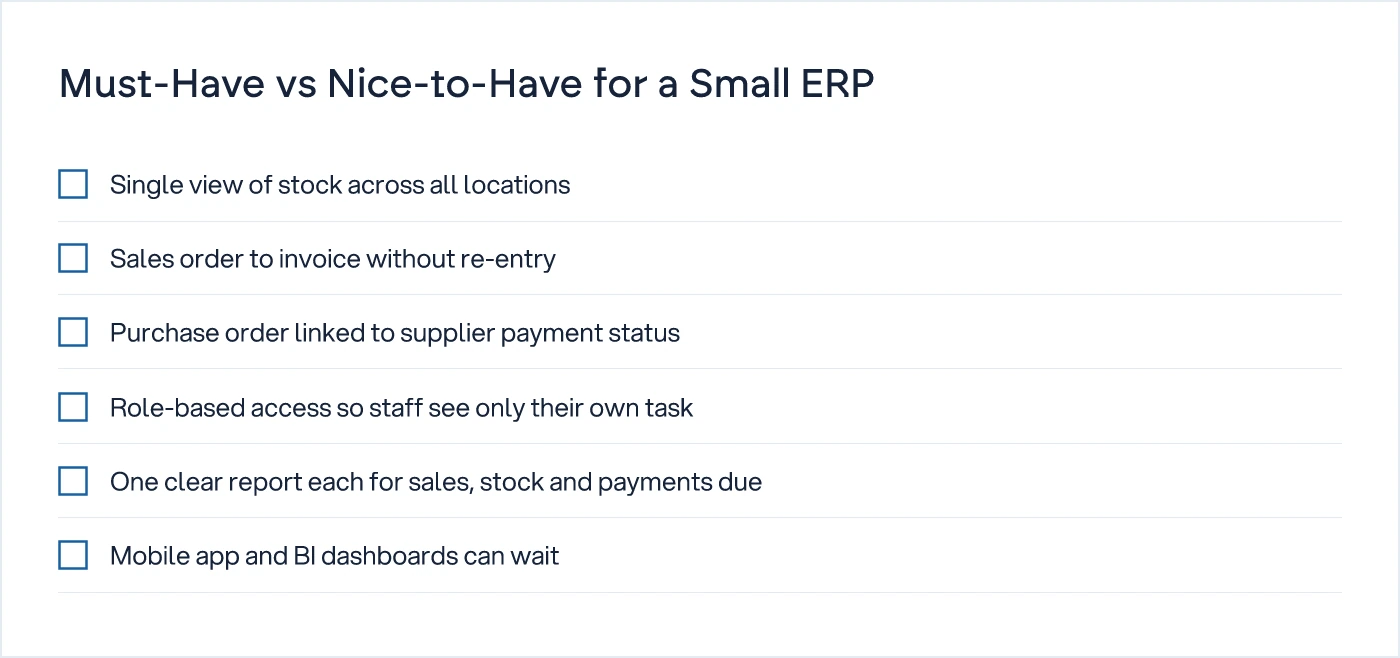
The pattern in that table repeats across most small businesses: the must-have column is about one person seeing one clear number, and the nice-to-have column is about making that number look impressive. Buy for the first column. The second column can wait a year, by which point you will know whether you even need it.
For manufacturing-specific requirements such as job cards and production plans, see ERP Software for Manufacturing: A Process-First Buyer's Checklist. The must-have list looks different once there is a shop floor involved, because a job card carries information a sales order never needs to.
How Do You Get the Team to Actually Use It?
Adoption fails when the new system and the old habits, WhatsApp, Excel, phone calls, run side by side. One of them has to stop.
Training once is not enough. Name one person responsible for answering questions about the system day to day, not the vendor's support line, which answers in hours when your store manager needs an answer in minutes. Require that approvals happen inside the system, not verbally in the corridor. If the answer needs a phone call, it is not a system.
Start with one module live for thirty days before switching on the next. Rolling out stock, sales, purchase and accounts on the same Monday for a ten-person team guarantees confusion, not control. Stock first is usually the right order, because it is the module with the clearest right answer: either the number on screen matches the shelf, or it does not.
Watch for one specific failure mode: a manager who keeps a parallel Excel sheet "just to be safe" for the first few months. That sheet is where the real numbers end up living, and it quietly kills adoption while everyone believes the rollout succeeded.
Which Simple ERP Tools Fit This Description?
A handful of lighter tools are built for the SME bracket specifically, rather than scaled down from enterprise software. Each fits a different shape of business.
6amERP is modular, letting you switch on only the pieces you need rather than paying for a full suite from day one.
notrinos is an open-source ERP, with its source available through Packagist, which suits a business with a technical person willing to self-host and adjust it.
Erp Lite, from NABCO, is positioned specifically as a lighter-weight option for small operations rather than a cut-down enterprise product.
Ximple ERP is a cloud ERP built for wholesale distributors, which is worth a look if your business is trading or distribution rather than manufacturing.
None of these is universally "the best". Fit depends on whether you trade, manufacture, or do job-work, and how much your process actually deviates from the standard flow. For a closer look at the larger platforms in this space, see Odoo vs Zoho vs Custom Software: How to Decide.
If your process has grown real exceptions, job-work costing, multi-unit stock, approval chains no "simple" ERP handles cleanly, that is a different decision. Our complete guide to ERP vs custom software covers when to stop hunting for a lighter tool and start scoping something built around your process, through custom software development.
Before signing anything, read The True Cost of an ERP Implementation, Beyond the Licence. If you are moving off an old system, also read What to Ask a Vendor Before You Trust Them with Your Production Data Migration.
We understand how your business actually works first, then we design the system. If you are not sure whether your process needs simplifying before any tool is chosen, a free 30-minute call is enough to find out.
Common questions
What is the simplest ERP for a small business?
The simplest ERP for a small business covers sales, purchase, stock and basic accounts in one place, runs for five to twenty users, and can be set up in weeks. It only stays simple if your order-to-cash process is already clear before you switch it on.
Is cloud ERP safe?
Cloud ERP is as safe as the vendor's security practices and your own password discipline. Check where data is hosted, how backups work, and who owns the data if you leave. Ask your IT advisor and, where relevant, your local data protection authority before signing.
What is SaaS ERP?
SaaS ERP is cloud ERP sold as a subscription. You pay monthly per user instead of buying a licence and running your own server. The vendor handles hosting, updates and security, which suits a small business without an in-house IT team.
How many users does a small ERP need?
Most SMEs need five to twenty logins, mapped to roles such as sales, store and accounts, not to every employee. Count the people who make or need a decision in the system, not your total headcount, when sizing user licences.
Sources
- The Complete Modular ERP Software Solution — 6amERP
- notrinos/notrinos-erp — Packagist
- Erp Lite — NABCO - Flexible IT Solutions & Services
- Ximple ERP | Cloud ERP Software for Wholesale Distributors — Ximple Solution

Sanket Vanani
Founder & CEO
Sanket Vanani is a business strategist and entrepreneur focused on helping businesses build structured systems for sustainable growth. His work spans sales, operations, manufacturing, process improvement, and business scalability. Through his experience working closely with business owners and teams, Sanket focuses on turning founder-dependent businesses into process-driven organizations that can grow with greater clarity, consistency, and control.
Related reading
ERP Software for Manufacturing: A Process-First Buyer's Checklist
A 20-point, process-first checklist for choosing ERP software for manufacturing, before you talk to a single vendor.
Odoo vs Zoho vs Custom Software: How to Decide
Odoo vs Zoho isn't the real decision. Map your process first, then pick the tool, and know when custom software is the better fit.
What to Ask a Vendor Before You Trust Them with Your Production Data Migration
Migration plans fail on ownership, not technology. Here are the questions a CTO should insist a legacy ERP vendor answer in writing before work starts.
The True Cost of an ERP Implementation, Beyond the Licence
Licence quotes rarely cover more than a quarter of what an ERP project ends up costing. Here is where the rest of the budget goes.


