
Odoo vs Zoho vs Custom Software: How to Decide
Odoo vs Zoho is the wrong first question. Both are capable platforms, but fit depends on your process, not the demo. Zoho suits straightforward sales-to-cash and service operations. Odoo suits deeper inventory, production and job-costing needs. Custom software makes sense when process exceptions, not standard transactions, drive your margin.
You have watched two demos this month. One for Odoo, one for Zoho. Both sales teams showed you dashboards, automation and an implementation timeline that sounded reasonable. Neither asked how your dispatch team handles a partial shipment, or how a purchase order gets approved when the owner is travelling.
That is the real problem with the Odoo vs Zoho question. It gets asked before the process is mapped, so the answer depends on which demo you saw last, not which system matches how your orders, stock and approvals actually move.
This post sets out what each platform does well, what it costs beyond the licence, and when neither is right and custom ERP software is the safer build.
Odoo vs Zoho: what's the real difference?
Odoo and Zoho are built around different starting assumptions about your business, so the comparison only works once you know which one matches yours.
Odoo began as an inventory and manufacturing tool and grew outward into a full suite of connected apps: purchase, manufacturing, inventory, accounting, all sharing one data model. Zoho began as a sales and productivity suite and grew towards operations. That history still shows in both products today, and it explains why the same demo question gets two very different answers depending on who you ask.
| Odoo | Zoho | Custom software | |
|---|---|---|---|
| Strengths | Deep inventory, bill-of-materials, manufacturing and multi-company accounting in one connected suite | Fast to deploy, strong CRM and sales-to-invoice flow, wide app bundle under one subscription | Matches your exact process, including exceptions a standard ERP cannot model |
| Gaps | Needs a partner to configure well; module sprawl can slow adoption | Manufacturing and multi-unit production depth is limited | Longer build time; ongoing ownership sits with you, not a vendor |
| Who it fits | Manufacturers, traders and distributors with inventory, job-costing or multi-location stock | Service businesses and trading firms built around sales pipeline and invoicing | Businesses where profit or loss lives in a process exception, not a standard transaction |
What does Odoo do well, and where does it fall short?
Odoo covers inventory, production and multi-company accounting well, but the depth that makes it useful also makes it harder to configure without help.
In the UAE and Saudi Arabia, Odoo has a wide partner network, so odoo uae searches usually lead to implementation partners rather than Odoo itself. That matters, because the platform is modular. You are not buying one product, you are assembling a set of apps, and the partner's configuration decides whether it fits your floor or fights it.
Odoo price depends on the number of apps you switch on and the number of users, not a flat licence fee. Before any demo, list which modules you actually need: inventory, manufacturing, purchase, accounting. Each one you add raises both the subscription cost and the implementation effort behind it.
Where it falls short: Odoo assumes your process can be expressed as standard documents, a sales order, a delivery, an invoice. If your real process runs on job cards, multi-stage job-work, or exceptions that do not fit a standard document flow, configuration turns into a long list of workarounds rather than a clean fit.
What does Zoho do well, and where does it fall short?
Zoho is quick to deploy and strong for sales, service and invoicing, but it was not built around inventory-heavy or production-heavy operations.
Zoho for business usually means Zoho One, a bundle of CRM, invoicing, HR and support apps under one subscription. For a trading firm or a services business where the core cycle is quote, order, invoice, payment, that bundle covers most of the ground without heavy configuration, and the apps already talk to each other.
Where it falls short: production planning, bill-of-materials, multi-unit stock movement and job costing are not Zoho's strength. Businesses that force manufacturing data into Zoho usually end up running a parallel spreadsheet for shop-floor tracking, which defeats the purpose of buying a system in the first place.
When does custom software make sense?
Build custom when your margin depends on an exception standard ERP was not designed to handle, not simply because you dislike the off-the-shelf screens.
A job-work manufacturer who bills by process stage rather than by finished unit needs costing logic that no standard module covers out of the box. Forcing that logic into Odoo or Zoho means endless customisation that behaves like a workaround, not a feature. We have covered the specific warning signs in detail here: Five Signs Off-the-Shelf ERP Won't Fit Your Process.
The rule holds regardless of which platform you are comparing: do not automate a bad process. If your approval chain, costing method or stock logic is broken today, no system, bought or built, fixes it on its own.
What does each option actually cost, in total?
The licence is usually the smallest line on the bill. Implementation, customisation and training tend to cost more than the software itself.
For Odoo or Zoho, the full bill runs across five lines: the licence or subscription, implementation (configuration, data migration, workflow setup), customisation (reports, approvals, integrations), training for users and administrators, and ongoing renewal or support. For custom ERP software, the lines shift to discovery, build, hosting and the team that maintains it afterwards.
Erp price conversations often start and end at the licence line, which is why budgets run short midway through implementation. We go deeper into this in The True Cost of an ERP Implementation, Beyond the Licence.
Whichever system you choose, the data migration decision needs a named owner before work starts, not after the contract is signed. See What to Ask a Vendor Before You Trust Them with Your Production Data Migration for the questions to put to any vendor first.
Ten questions to answer before you watch a demo
- Which process produces your real profit or loss, and does it fit a standard document flow?
- Who approves a purchase order today, and does that person need to approve inside the new system?
- Where does your current process actually stall: follow-up calls, pending approvals, manual stock checks?
- How many users need access on day one, and how does that change the odoo price or zoho for business subscription?
- Does your business run job-work, multi-stage production, or process-based costing?
- Which reports does the owner check every week, and will the new system produce them without a manual export?
- How many locations or units need visibility into one shared stock position?
- What happens to historical data, and who owns the migration decision?
- Who inside the business will administer the system after go-live?
- If neither Odoo nor Zoho fits without heavy customisation, is custom ERP software the cheaper path over three years?
Common mistakes in choosing between Odoo, Zoho and custom software
Most selection mistakes happen before the demo, not during it, because the process was never mapped first.
- Comparing licence prices before mapping the process that needs to run on the system.
- Letting the sales demo set the requirement list, instead of the other way round.
- Assuming customisation is a one-time cost rather than an ongoing one.
- Choosing based on what a competitor uses, without checking if the operations actually match.
- Leaving the migration-ownership question until after the contract is signed.
- Treating training as a formality instead of the reason adoption fails or succeeds.
How to decide, not guess
Decide by mapping your process first, then test Odoo, Zoho and custom software against that map, not the other way round.
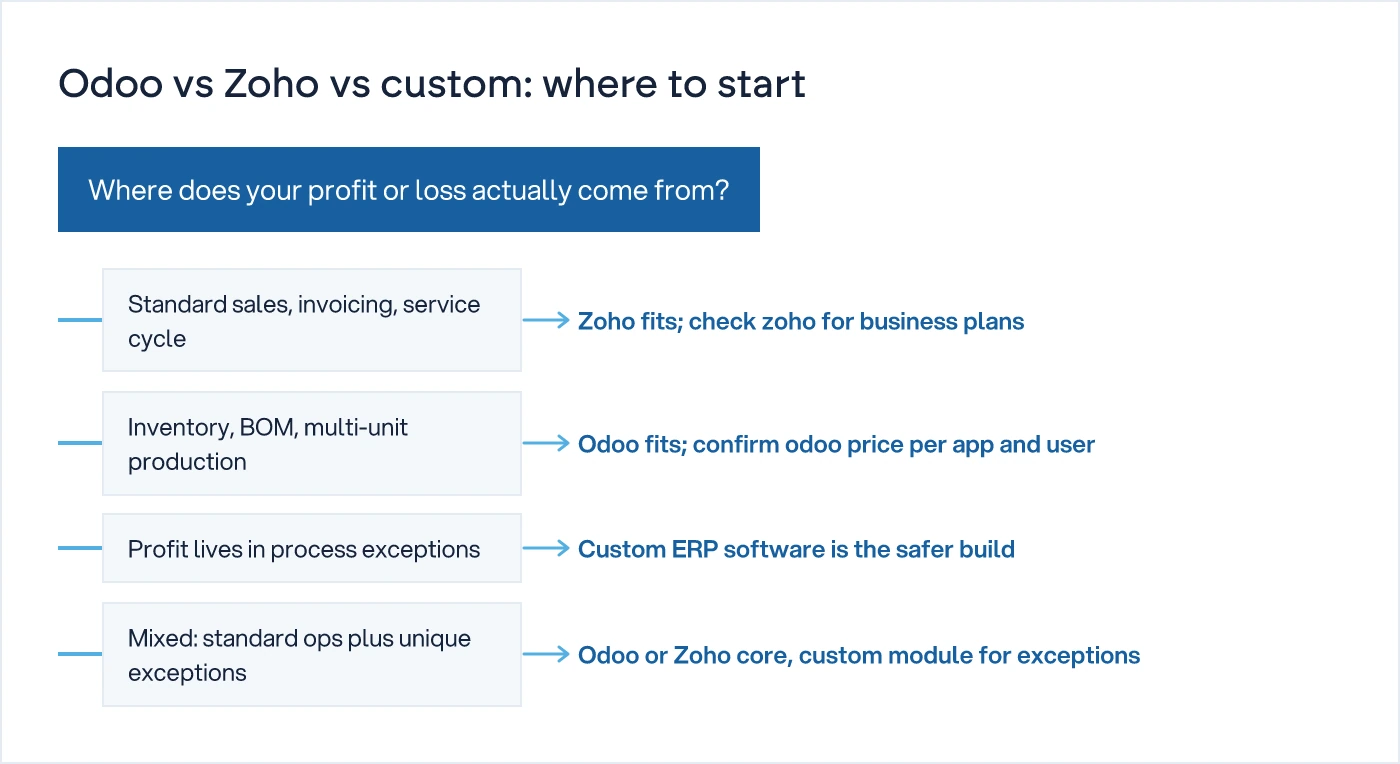
For the fuller picture on when to buy off-the-shelf and when to build, see our hub on ERP vs Custom Software. If the map shows you need something built around your process rather than bent to fit one, that is where custom software development comes in.
A free 30-minute call is usually enough to tell you which of the three you are looking at. If the process needs a closer look at the floor or warehouse itself, SCAN (System Clarity & Actionable Needs) is the paid, on-site next step.
If the answer needs a phone call, it's not a system.
Common questions
Is Odoo better than Zoho for manufacturing?
Odoo is usually the closer fit for manufacturing because it covers inventory, bill-of-materials and multi-unit stock out of the box. Zoho can handle basic manufacturing but its strength lies in sales, service and invoicing. For job-costing or multi-stage production, check Odoo first, then confirm the fit against your actual process map.
How much does Odoo cost?
Odoo pricing depends on the number of apps you activate and the number of users, not a flat fee. Implementation, data migration, customisation and training usually cost more than the subscription itself. Check Odoo's own pricing page for current rates, and treat any figure quoted in a demo as a starting point, not the total.
When should a business build custom software instead?
Build custom when your margin depends on a process exception standard ERP was not designed around, such as job-work costing or non-standard approvals. If workarounds pile up faster than features, that is the signal. Custom ERP software costs more upfront but avoids years of fighting a system built for someone else's process.
Can I switch from Zoho to Odoo later?
Yes, but treat it as a fresh implementation, not an upgrade. Data migration, user retraining and workflow redesign all repeat. Before switching, confirm who owns the migration decision and what happens to historical records. Switching later is common; switching cheaply rarely happens, so map the process properly the first time.
Sources
- Odoo vs Zoho 2026: ERP Comparison for Growing Businesses — Oasis Techno Cloud
- Odoo vs Zoho (2026): Pricing, Features & Which to Pick — Viziontools
- Zoho One vs Odoo: An Honest Comparison for 2026 Buyers — Aaxonix

Sanket Vanani
Founder & CEO
Sanket Vanani is a business strategist and entrepreneur focused on helping businesses build structured systems for sustainable growth. His work spans sales, operations, manufacturing, process improvement, and business scalability. Through his experience working closely with business owners and teams, Sanket focuses on turning founder-dependent businesses into process-driven organizations that can grow with greater clarity, consistency, and control.
Related reading
What to Ask a Vendor Before You Trust Them with Your Production Data Migration
Migration plans fail on ownership, not technology. Here are the questions a CTO should insist a legacy ERP vendor answer in writing before work starts.
The True Cost of an ERP Implementation, Beyond the Licence
Licence quotes rarely cover more than a quarter of what an ERP project ends up costing. Here is where the rest of the budget goes.
Five Signs Off-the-Shelf ERP Won't Fit Your Process
Five process exceptions, from job-work costing to multi-unit pricing, that show when ERP customisation stops working and custom software fits better.


