
What to Ask a Vendor Before You Trust Them with Your Production Data Migration
Most ERP migration failures start with an unanswered ownership question, not a technical gap. Before work begins, get written answers on who signs off clean data, who decides what gets archived, what triggers a rollback, who calls it, and what counts as done. If the vendor can't answer in writing, don't start.
Why do ERP migrations fail even when the technical plan looks sound?
Because the plan answers how the data moves and nobody has answered who decides when the data doesn't match. Field mapping, validation scripts, cutover windows, rollback scripts: these are solvable problems, and most vendors solve them competently. What derails a migration is the moment three weeks in when the reconciliation report shows 40,000 open sales orders in the legacy system and 39,640 in the new one, and nobody in the room has the authority to say what happens next.
That gap isn't technical. It's organisational, and it was there before the project started. The vendor didn't hide it. Nobody asked.
If you're migrating off a legacy ERP because it's hitting end-of-support, or because the business has outgrown what it was built to handle, the technical checklist is well documented elsewhere: field mapping, validation rules, cutover sequencing, rollback scripts. A checklist covering mapping, validation, cutover and rollback is worth reading alongside this one. This post covers the questions that checklist doesn't ask: who is accountable for each decision, and what happens when the data disagrees with the plan.
Who decides what counts as "clean" data before migration starts?
The business does, in writing, before the vendor starts mapping fields. Not the vendor, and not "the team will review it."
Every legacy ERP has data nobody has looked at properly in years: customer records with three versions of the same company name, stock items with units of measure that stopped making sense after a packaging change, vendor codes duplicated because someone re-entered a supplier instead of searching for the existing one. A vendor can run a script to flag these. A vendor cannot decide which version of the customer record is correct. That decision needs a name attached to it: usually the finance controller for ledger data, the plant head or stores manager for inventory data, and sales ops for customer and pricing data.
Ask the vendor directly: who signs off the cleaned dataset before it loads into the new system, and what happens if that person is unavailable during the cutover window? If the answer is vague, that's the first unanswered ownership question, and it's the one that causes the most delay, because cleaning data without an owner means someone eventually has to redo it under pressure.
What should be in writing before the vendor touches production data?
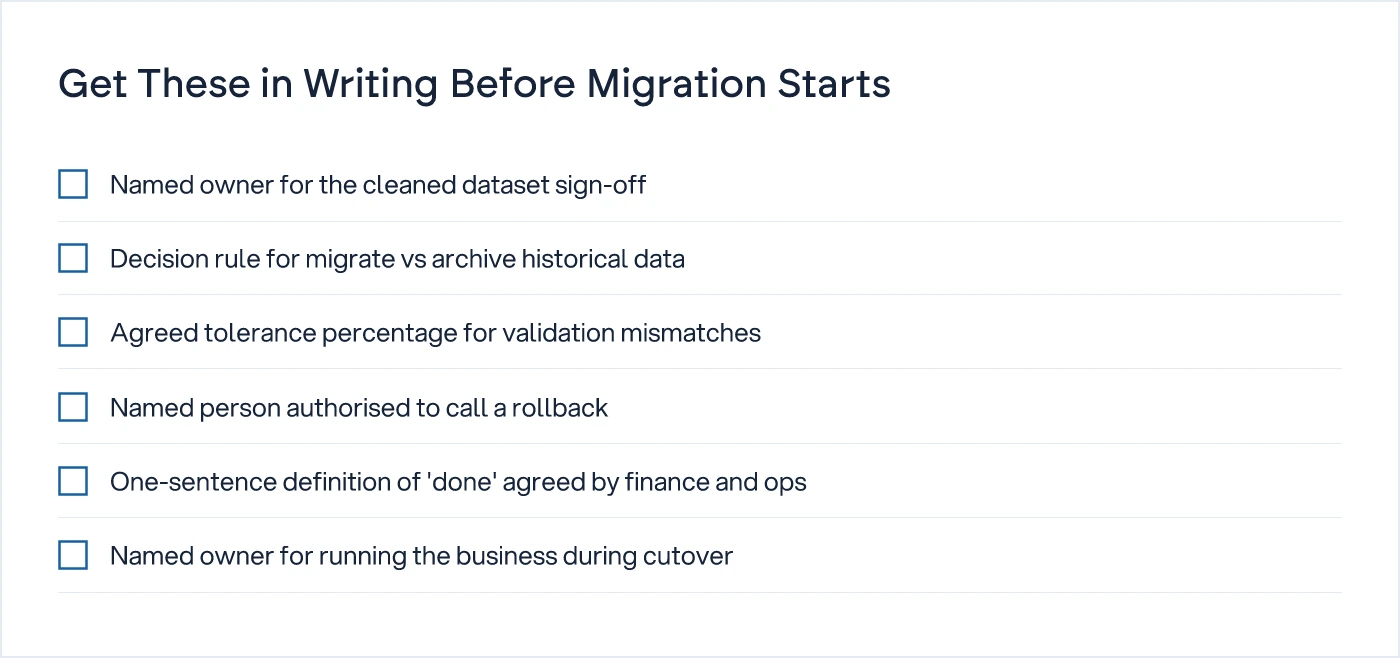
Six specific commitments, each with a named owner, not a named team.
A checklist of questions to ask before legacy ERP migration and a seven-dimension audit method for evaluating readiness both make the same point from different angles: most failures are visible in the audit stage, before a single record moves. The specific commitments worth insisting on, in writing, before work begins:
- Who owns the field mapping document, and who approves changes to it mid-project.
- Who decides which historical records get migrated in full, summarised, or archived and left in read-only access.
- What the validation method is, what tolerance counts as acceptable, and who signs off the validated count before go-live.
- What triggers a rollback, and who has the authority to call it during the cutover window.
- What "done" means for this migration, in a sentence the plant head and the finance controller would both agree with.
- Who runs the business during the cutover window, on paper, if the new system isn't ready when the old one goes dark.
If the answer to any of these needs a phone call to figure out, it's not a system yet, and the migration plan isn't finished either, regardless of how detailed the technical runbook looks.
What happens when the vendor finds a discrepancy mid-migration?
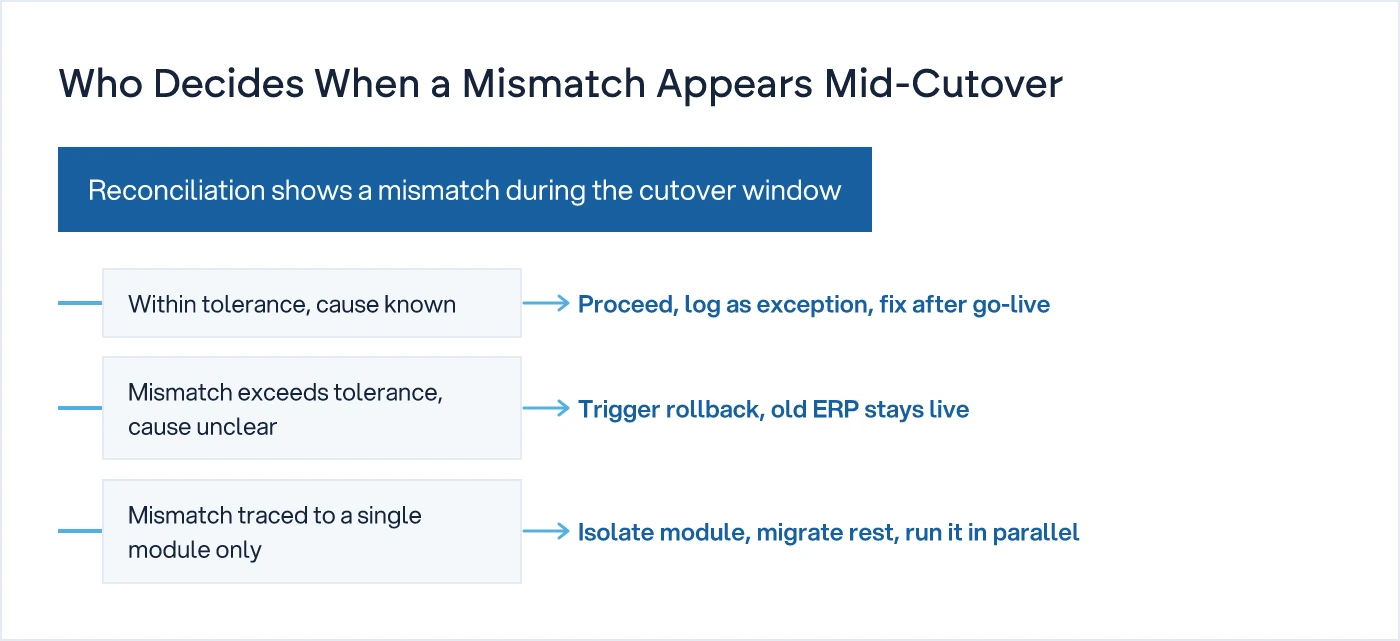
It depends on the size of the discrepancy and whether the cause is known, and that decision tree should exist before cutover starts, not get invented during it.
A small, explainable gap, say a known batch of returns that wasn't reconciled in the old system, gets logged as an exception and fixed after go-live. A gap that exceeds the agreed tolerance and has no clear cause should trigger a rollback, with the old ERP staying live while the root cause gets found. A gap traced to one module only, commonly stock valuation or WIP costing in manufacturing, can sometimes be isolated: migrate everything else, hold that module back, run it in parallel until the numbers reconcile.
None of this works if "acceptable tolerance" was never defined, or if the person who can authorise a rollback is three time zones away and asleep during the cutover window. Put the tolerance number in the contract. Put the rollback authority's name in the contract. Not a role, a name.
How do you compare a vendor who answers these questions properly against one who doesn't?
The difference shows up in specificity, not confidence. Both will sound confident. Only one will give you a name, a number, and a date.
| Question | Vague vendor answer | What you should get in writing |
|---|---|---|
| Who signs off clean data? | "Your team and ours will review it together" | Named individual, by role, with a deadline before mapping starts |
| What's the rollback trigger? | "We'll assess if there's an issue" | A tolerance percentage, and the named person authorised to call it |
| What counts as done? | "When the system is live and working" | A one-sentence definition both finance and operations agree with, signed before cutover |
| Who owns the business during cutover? | "It'll be a quick switch" | A named owner, a defined window, and a fallback process if the window runs long |
| What happens to old data? | "We'll migrate what's needed" | A decision, per data category, on migrate, summarise, or archive, made by the business |
A checklist of seven readiness signs, including whether your team can even answer these questions before signing a contract, is covered in this pre-migration readiness checklist, and it's worth running through internally before the vendor conversation even starts.
Does this apply if you're migrating to custom software instead of another ERP?
Yes, and arguably more so, because there's no vendor playbook to fall back on. A custom system is built around how your business actually runs, which means the data migration has to match your actual process, not a generic module structure. If your process has exceptions, job-work costing, multi-unit stock valuation, partial dispatches against a single sales order, those exceptions are exactly where legacy data gets messy, and exactly where ownership questions matter most. Five Signs Off-the-Shelf ERP Won't Fit Your Process covers why these exceptions exist in the first place. The migration cost of handling them properly, rather than forcing them into a standard template, is part of what's usually missing from the licence quote, as covered in The True Cost of an ERP Implementation, Beyond the Licence.
We understand how your business actually works first, then we design the system. A migration plan built on a feature list and a field-mapping spreadsheet will move the data. It won't tell you who's accountable when the data doesn't match, and that's the question that decides whether the project finishes on time.
What to do before you sign anything
Put these six questions in front of your current ERP vendor and your prospective one, in writing, and compare the answers side by side. If one gives you names and numbers and the other gives you reassurance, you already have your answer. For a broader view of how ERP decisions play out against custom-built alternatives, the ERP vs Custom Software hub covers the ground this post doesn't. If you're weighing up a migration against a rebuild, ThetaSol's custom software development team can walk through the ownership questions with you before you commit to either path.
Common questions
What is the single most important question to ask before a legacy ERP migration?
Who signs off the cleaned data before it loads into the new system, by name, not by team. Most migration delays trace back to a data discrepancy found mid-project with nobody authorised to decide what's correct. Get this named and in writing before the vendor starts mapping fields, not after.
Should the rollback decision sit with the vendor or the business?
The business, always. A vendor can tell you the tolerance has been exceeded. Only someone inside the business, usually the CTO or plant head with finance sign-off, has the authority to decide whether to roll back or proceed with exceptions. Name that person in the contract, not as a role but as an individual.
How much historical data should actually be migrated?
Less than most businesses assume. Full migration of every historical record is expensive and often unnecessary. A better approach is per-category: migrate open and recent transactions in full, summarise closed ones, and keep old records in read-only archive access. This decision belongs to the business, not the vendor's default settings.
What should the cutover window actually include?
A defined start and end time, a named person responsible for running the business if the new system isn't ready when the old one goes dark, and a pre-agreed tolerance for data mismatches. Without these three, the cutover window is a hope, not a plan.
Is a data migration different when moving to custom software instead of another ERP?
The ownership questions are identical, but there's no vendor template to fall back on, which makes them more important. Custom systems are built around your actual process exceptions, and that's exactly where legacy data tends to be messiest. Treat the migration plan with the same rigour you'd apply to the system build itself.
Sources
- Legacy ERP Migration: 6 Questions to Ask Before You Start — TMR Consulting
- ERP Data Migration Checklist: Mapping, Validation, Cutover, And Rollback — NextPage IT
- ERP Audit 2026: Evaluate Your System Before Migration (7-Dimension Method) — ERP Implementation EU
- ERP Migration Checklist 2026: 7 Signs You're Not Ready to Sign — CTO Input

Sanket Vanani
Founder & CEO
Sanket Vanani is a business strategist and entrepreneur focused on helping businesses build structured systems for sustainable growth. His work spans sales, operations, manufacturing, process improvement, and business scalability. Through his experience working closely with business owners and teams, Sanket focuses on turning founder-dependent businesses into process-driven organizations that can grow with greater clarity, consistency, and control.
Related reading
The True Cost of an ERP Implementation, Beyond the Licence
Licence quotes rarely cover more than a quarter of what an ERP project ends up costing. Here is where the rest of the budget goes.
Five Signs Off-the-Shelf ERP Won't Fit Your Process
Five process exceptions, from job-work costing to multi-unit pricing, that show when ERP customisation stops working and custom software fits better.


