
Five Signs Off-the-Shelf ERP Won't Fit Your Process
You need custom software when your real profit or loss lives in process exceptions such as job-work costing, multi-unit pricing, or judgement-based approvals. If off-the-shelf ERP forces those exceptions into spreadsheets or manual overrides every week, customisation is a patch, not a fix, and a purpose-built system is the better decision.
What does it mean when an ERP "almost" fits your process?
It means the ERP handles your standard transaction correctly but breaks at the exception, and someone on your team quietly routes around it every time.
Every ERP demo looks clean because the demo runs a standard transaction: one item, one price, one approval, one cost line. Your business doesn't run standard transactions all day. It runs the standard case most of the time and the exception case on the transactions that actually decide your margin. The exception is where job-work costing lives, where pricing gets negotiated, where an approval needs a human call, not a threshold. If you keep finding that the exception gets handled in Excel, on WhatsApp, or in someone's head, that's not a training gap. That's the software telling you it wasn't built for how you actually work.
The five signs below aren't features an ERP is missing. They're places where your process and the ERP's assumptions disagree, and the disagreement costs you time, margin, or visibility every month.
Sign 1: your job-work costing doesn't have a home in the ERP
If material leaves your factory, gets processed by a vendor, and comes back partially finished, and you need one landed cost across both legs, most ERPs will make you track it as two disconnected transactions.
Take a fabricator sending steel sheet out for cutting and bending. The sheet leaves as a stock transfer. The job worker charges a processing fee plus his own material for consumables. The sheet comes back, sometimes short by wastage, sometimes late, sometimes from a second job worker who does the finishing. The true cost of that finished part includes your material, the job worker's fee, freight both ways, and the wastage variance. Off-the-shelf ERP job-work modules usually assume a single vendor, single leg, standard yield. The moment you have multi-stage job work with variable yield, the ERP's costing report is wrong, and your costing sheet lives in Excel instead.
Sign 2: you price the same item three different ways depending on who's buying
If your price list changes by customer, by quantity slab, and by domestic versus export sale, and each of those uses a different unit of measure, your ERP's single price-per-UOM structure will fight you on every invoice.
A trading business might sell the same item in pieces to a local retailer, in kilograms to an export customer, and at a slab rate to a distributor who crosses a volume threshold mid-month. Each of those needs its own conversion factor and its own approval logic for discounts. Most ERPs handle one price list per UOM cleanly. The moment you need three, the workaround is usually a sales team member manually overriding the price on every invoice, which means the price list in the ERP stops being the actual price list.
Sign 3: your approval chain depends on who's involved, not just the amount
If a purchase gets extra scrutiny because it's a new vendor, but a bigger order from a trusted vendor clears automatically, your ERP's amount-based approval matrix can't encode that without heavy customisation.
Most ERP approval workflows are built on thresholds: above a certain value, route to the general manager. Real approval logic in an owner-run business is rarely that flat. A ₹2 lakh order from a new supplier might need the quality head's sign-off. A ₹15 lakh repeat order from an approved vendor might clear without anyone looking twice, because the relationship and the track record already did the vetting. If the answer needs a phone call, it's not a system, and if your approvals are still happening over phone or WhatsApp with the ERP updated afterwards as a formality, the ERP isn't running your approval process. It's recording it after the fact.
Sign 4: the real cost of a job isn't known until after it's already been booked
If yield variance, scrap, and byproduct sale change the actual cost of a production run after the ERP has already posted a standard cost, your margin numbers are wrong for as long as that gap exists.
A plastics or metal processing unit books standard cost at the time of production: so much raw material, so much labour, so much overhead. But the actual yield is only known once the run closes, wastage is measured, and any byproduct (offcuts, rejects sold as scrap) is sold. That gap between standard cost and actual cost might be two or three days, or it might be a full month-end reconciliation. If a customer's pricing decision or a plant head's go/no-go on a second shift depends on real margin, and real margin isn't visible until reconciliation, the decision is being made blind for that window. Off-the-shelf ERP costing is built to close a transaction, not to hold a job open until the true cost is known.
Sign 5: you run more than one unit and the numbers don't add up on the same day
If you operate an entity in India and one in the UAE, with different compliance regimes and reporting periods, and the owner needs a consolidated view, most ERPs make you build that view outside the ERP.
GST and VAT have different filing cycles, different tax treatment, and often different chart-of-account structures if each entity's ERP instance was set up independently. The owner wants one number: total receivables, total order book, total cash position, across both units, today. Standard ERP licensing is usually per-entity, and consolidation across entities is either a separate expensive module or a manual export-import into a spreadsheet every month. By the time that spreadsheet is built, the number is already a few weeks old.
| Process exception | What standard ERP assumes | What actually happens on your floor | Cost of forcing the fit | |---|---|---| | Job-work costing | One transaction, one location | Material leaves, is processed elsewhere, returns partially finished | Landed cost tracked in a parallel spreadsheet | | Multi-unit pricing | One price list per UOM | Price depends on customer, quantity slab, export or domestic | Sales team overrides price manually on every invoice | | Approval chains | Amount-based threshold only | Approval depends on vendor history, not just the amount | Approvals happen by phone, ERP updated afterwards | | Yield and byproduct costing | Cost fixed at the transaction | Actual cost known only after the production run closes | Margin reports are wrong until month-end reconciliation | | Multi-entity consolidation | Single entity, single currency | Two entities, two compliance regimes, one owner needing one view | Manual consolidation in Excel every month |
How do you decide between customising the ERP and building something separate?
Decide based on whether the exception is occasional or whether it's actually how your business makes its money. Occasional exceptions are worth a workaround or a paid customisation. Exceptions that show up on most transactions are worth building properly.
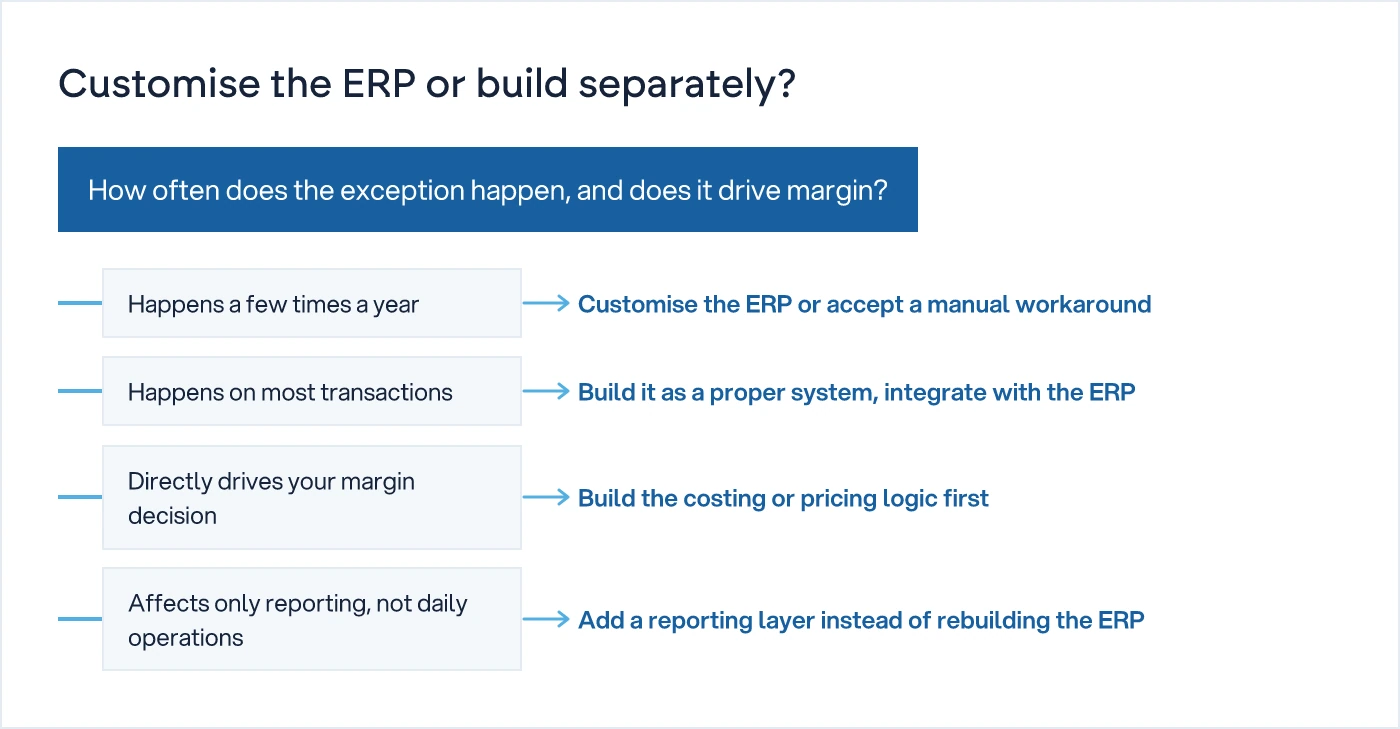
If job-work costing happens twice a year, live with the spreadsheet. If it happens on sixty percent of your production, the spreadsheet is your real system and the ERP is decoration around it. The same test applies to pricing, approvals, and consolidation. Ask where the exception sits relative to your revenue, not relative to how annoying it is. This is also where the decision needs an honest look at whether the process itself deserves to survive. Do not automate a bad process. If the job-work costing method is a workaround for a supplier relationship that should have been renegotiated years ago, fix the relationship before you fix the software.
For a broader look at when to stay on ERP versus when to build, our ERP vs custom software hub covers the decision from cost, timeline, and ownership angles. If the exception is where your money is actually made, our custom software development work usually starts by mapping that exception in detail before a single screen gets designed.
What should you do before renewing or signing an ERP contract?
Run a short audit of your own exceptions before you sign anything. Most ERP renewal decisions get made on price and feature lists, not on whether the last twelve months of exceptions were actually handled by the system or handled around it.
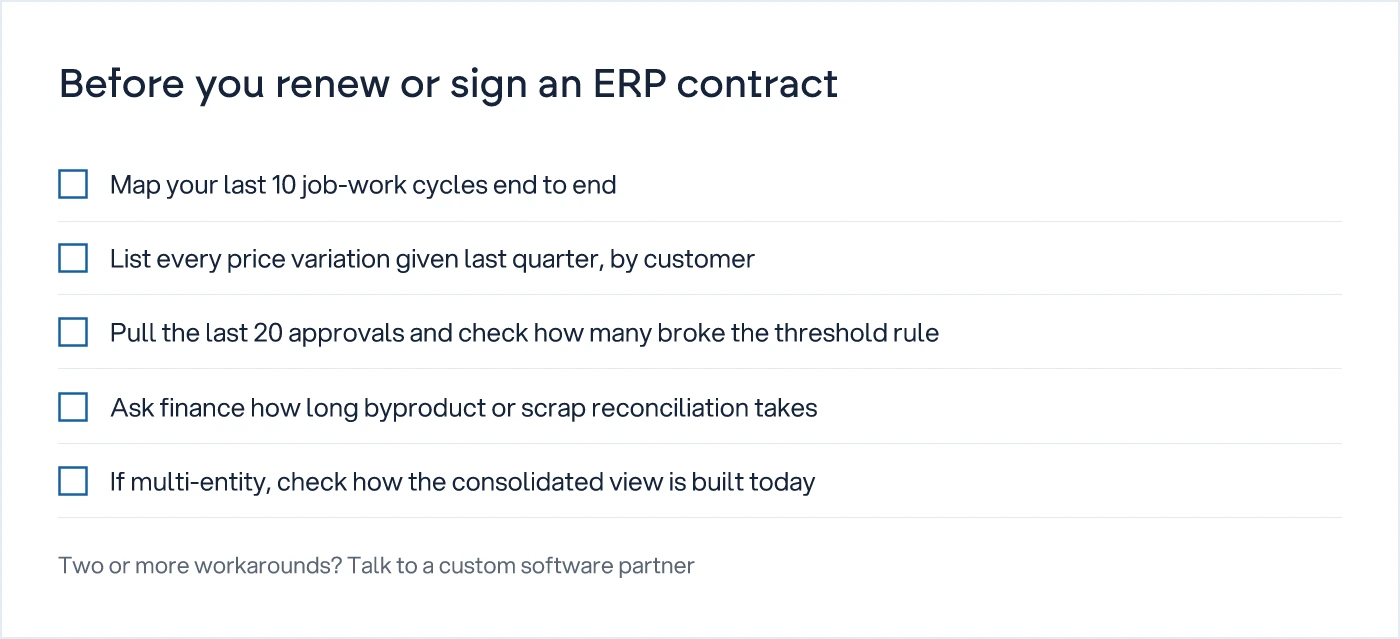
Pull the evidence yourself. Walk your last ten job-work cycles and see where the cost tracking left the ERP. List every price variation your sales team gave last quarter and check how many needed a manual override. Pull the last twenty approvals and count how many followed the simple threshold rule versus how many needed a judgement call outside the system. Ask finance how many days the byproduct or scrap reconciliation takes each month. If you run more than one entity, ask how the consolidated number gets built today, and how old it is by the time the owner sees it.
The answers to those five questions tell you more about whether you need custom software than any feature comparison sheet from a vendor. We understand how your business actually works first, then we design the system around it, not the other way round.
Next step
Before you renew or sign an ERP contract, spend a week mapping the exceptions above against your own operation. If two or more of them show up as a recurring manual workaround, that's the conversation to have before the contract, not after.
Common questions
How do I know if I need custom software instead of an ERP?
Look at where your ERP breaks down: not the standard transaction, but the exception. If job-work costing, multi-unit pricing, judgement-based approvals, yield variance, or multi-entity consolidation regularly force your team into spreadsheets or manual overrides, that exception is where your business actually runs, and it's a strong sign a purpose-built system will serve you better than further ERP customisation.
Can I just customise my existing ERP instead of building something new?
Yes, for occasional exceptions. Customisation makes sense when the exception happens rarely and the cost of a workaround is low. It stops making sense when the exception happens on most transactions, because every ERP version upgrade risks breaking the customisation, and you end up paying to maintain a patch on top of software that was never designed for your process.
Is job-work costing a common reason manufacturers move to custom software?
It's one of the most common reasons in India and the GCC, particularly for fabrication, textile processing, and metal finishing businesses that route material through one or more job workers. Most off-the-shelf ERP job-work modules assume a single vendor and standard yield, which doesn't match multi-stage job work with variable wastage.
What's the risk of forcing my process into an ERP that doesn't fit?
The main risk is that the reports stop being trustworthy. When exceptions get handled outside the ERP, in Excel or over phone calls, the ERP's dashboards look complete but the numbers behind them are stale or wrong. Owners end up making decisions on the workaround, not on the system they paid for.
Do I need to replace my ERP entirely if I build custom software?
Usually not. Most businesses keep the ERP for standard transactions such as inventory, basic accounting, and standard sales orders, and build a separate system for the specific exception, such as job-work costing or multi-entity consolidation, integrated back into the ERP. Full replacement is rare and only justified when the exception has become most of the business.
Sources

Sanket Vanani
Founder & CEO
Sanket Vanani is a business strategist and entrepreneur focused on helping businesses build structured systems for sustainable growth. His work spans sales, operations, manufacturing, process improvement, and business scalability. Through his experience working closely with business owners and teams, Sanket focuses on turning founder-dependent businesses into process-driven organizations that can grow with greater clarity, consistency, and control.
Related reading
How to Choose the Right ERP Integration Pattern
A technical framework for choosing between API-first, event-driven and batch sync when connecting ERP, CRM and shop floor systems.
Simple ERP System for Small Business: What to Fix First
A simple ERP only stays simple if the process behind it is clear. Fix the process first, then pick the lightest cloud tool that fits.
Kaizen for Small Factories: Start It, Make It Stick
Kaizen fades without daily numbers. A 30-day plan, the metrics to track, and why most 5S boards go quiet after month one.


