
When Excel Stops Working: The Real Signs You've Outgrown It
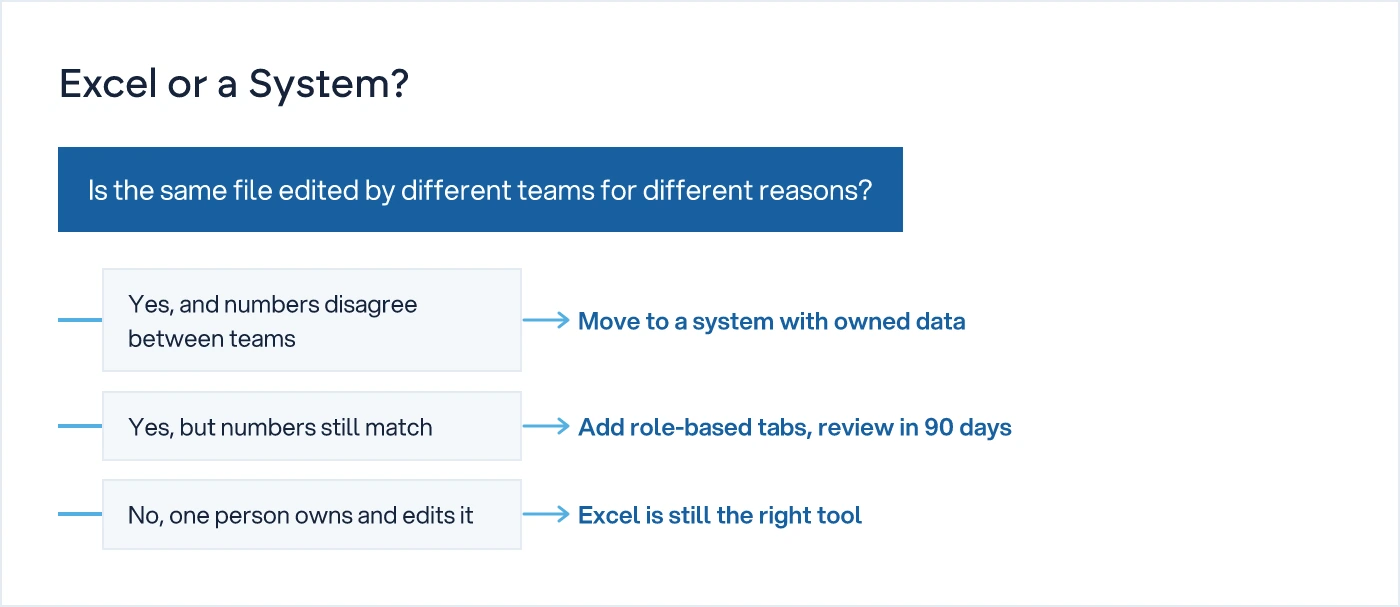
You have outgrown Excel the day the same file is being edited by different people for different reasons: one for stock, another for orders, another for finance. Once two people need two different truths from one sheet, formulas will not fix it. That is the point to stop patching and build a system.
Every manufacturing or trading business has one file like this. It started as a stock register, or a production log, or a pending-orders sheet. One person built it. One person owned it. Then the business grew, and more people needed it. Now the same file has a tab for the store, a tab for accounts, a tab for dispatch, and three people editing it before 11 a.m. most days.
That is the trigger. Not the size of the file. Not the number of rows or the number of tabs. The trigger is that the same spreadsheet is being edited by different people, for different reasons, on the same day, and none of them fully trusts what they see when they open it.
What is the real sign that a business has outgrown Excel?
The real sign is not slowness or crashes. It is that two people looking at the same file give you two different answers to the same question. The store head says 40 units of a part are in stock. The dispatch team, working off the same file an hour earlier, says 25. Both are telling the truth as they last saved it. The file has stopped being one version of the truth and become several people's private copy of it, saved over each other.
Once this happens once, it will happen again. And the second and third time, someone stops trusting the sheet altogether and starts keeping a parallel note on paper or WhatsApp, which makes the original file even less reliable.
Why does the "same file, different reasons" problem happen?
It happens because a spreadsheet has no concept of who is allowed to change what, or when. A purchase order sheet is a good example. Store updates the stock quantity when material physically arrives. Accounts marks the row paid once the invoice clears. Sales marks it dispatched once the goods leave. Three functions, one file, no lock on the row, no log of who changed what and when.
On an ordinary Tuesday, store updates the stock count for a stock audit while sales is halfway through updating the dispatch status on the same row. Whoever saves last wins. The other person's update is gone, and nobody knows it happened until a customer calls asking why a dispatched order still shows pending.
This is not a one-off mistake. It is what happens whenever more than one function edits the same source of truth without a system deciding who owns which field.
What usually goes wrong before the owner notices?
A few patterns repeat across businesses that are past this point, long before the owner sees it as a system problem rather than a people problem:
- Two departments quote different numbers for the same stock, order, or payment, and each is confident they are right.
- A formula or macro breaks, and only the one person who built it years ago knows how to fix it.
- Someone copies part of the sheet into a new file "just for this week's report," and that copy quietly becomes the version other people start using.
- Pending gets counted twice or missed entirely, because two people were each updating their own version of the same list.
| Symptom you see | What it actually means | What patching usually does |
|---|---|---|
| Two people quote different stock numbers for the same SKU | The file has more than one owner of the truth | Adds a note column, doesn't fix who owns the number |
| A formula breaks and only one person can fix it | The business depends on one person's memory, not a system | Someone rebuilds it, the same risk repeats next quarter |
| Data gets copied into another sheet "just for this report" | The file is now two files pretending to be one | Adds a VLOOKUP, adds another point of failure |
| You ask what's actually pending and the answer needs a phone call | Nobody can query pending, only recall it | Works while one person is reachable, breaks when they're not |
If the answer needs a phone call, it's not a system. That line is worth sitting with, because most owners only notice the cost of this the day the one person who knows the file is on leave, or has left the company.
Isn't this just a training or discipline problem?
Sometimes, but not here. Poor formatting, missing updates, and typos are training problems, and a stricter process can fix those. What training cannot fix is that Excel has no concept of who is allowed to edit a row right now, or what the number was an hour ago before someone changed it. Even a well-trained, careful team will overwrite each other's work if three of them are editing the same file for three different reasons. The tool is missing something training cannot supply: ownership of data at the field level, and a record of every change.
When should you stop patching and move to a system?
Here is the one-line rule: the day two departments need two different things from the same file at the same time, stop patching the file and start separating what each function owns.
In practice, this means stock has one owner and one place it lives. Orders have one owner and one place they live. Dispatch has one owner and one place it lives. Each of those feeds into a combined view that the owner or manager looks at to decide what needs attention, which is a different problem from where the data itself lives. If you have not yet defined what belongs on that combined view, What Belongs on Your First Management Dashboard covers exactly that decision.
What actually changes when you move off Excel?
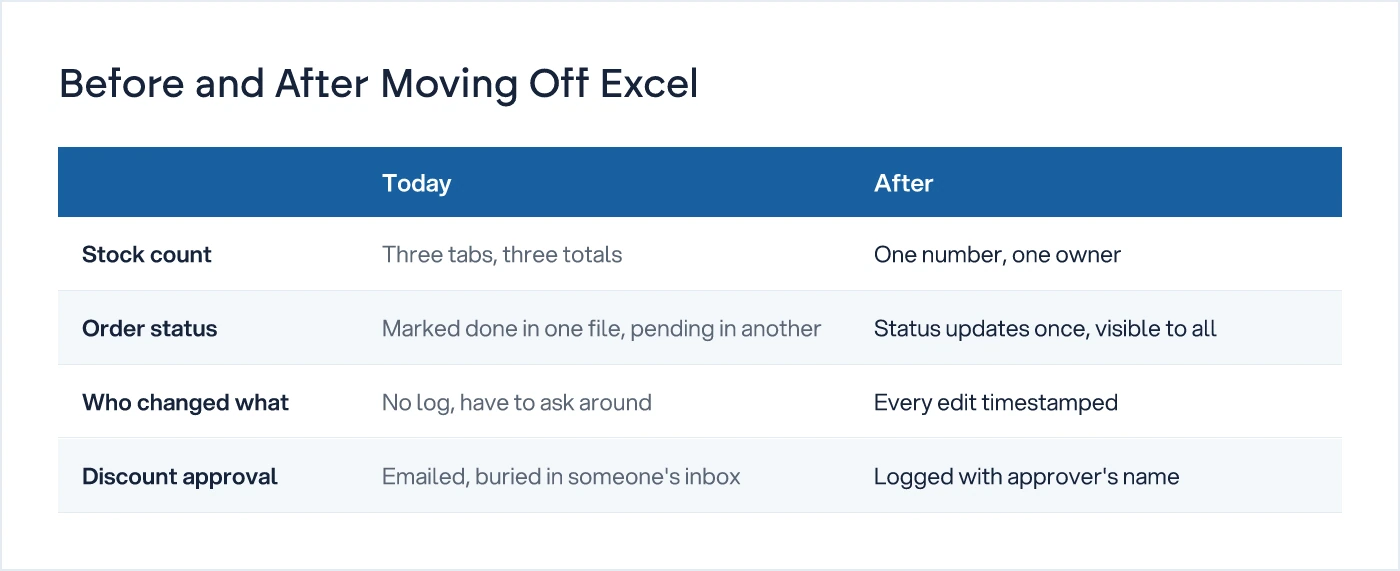
Excel does not disappear. It stops being the system of record and becomes what it is good at: an export, a working sheet for one person's analysis, a report you download once a week. The system of record is a different thing entirely. It knows who is allowed to change what, it timestamps every edit, and it shows the current state of a stock number, an order, or a discount approval without anyone needing to ask around first.
This is also the point at which the underlying process gets looked at properly, not just moved as-is into a screen. Do not automate a bad process. If store, sales, and accounts are updating the same field for three unrelated reasons because nobody ever decided who owns stock updates, moving that mess into an app just makes the mess load faster. We understand how your business actually works first, then we design the system. That is a different exercise from digitising a spreadsheet, and it usually surfaces one or two approvals that should not need a person to be reachable at all, which is the same ground covered in The First Five SOPs Every Growing Business Should Document.
The same discipline applies at shift or team boundaries, where handovers often live inside the same fragile spreadsheet habit. Shift Handover: What Should Actually Be Written Down is worth reading alongside this if your pending list changes hands more than once a day.
What should an owner do this week?
Start by naming the one file in the business that more than one department edits for different reasons. Write down, honestly, who edits it and why. If you cannot answer that in one sentence per person, you already have your answer on whether Excel is still the right tool for that particular job.
This does not mean replacing every spreadsheet in the business. Most businesses run several sheets that one person owns, that nobody else touches, and that work perfectly well. Those are not the problem. The problem is the shared one, edited by different people, for different reasons, that everyone privately distrusts a little.
If that file exists in your business right now, the fix is not a better template. It is deciding who owns what, and building a system around that decision. Our Digital Transformation service starts with exactly that mapping exercise, before any screen gets built. You can also see the wider set of ideas on this in Business Systems, SOPs and Visibility.
Common questions
How do I know when to move from Excel to a system?
The clearest sign is that the same file is being edited by different people for different reasons on the same day, and their numbers stop matching. Slowness, crashes, or file size are not reliable signs. Two departments quoting different stock or order figures from the same sheet is the actual trigger to stop patching and move to a system with owned data.
Can I just fix Excel with better formulas or a template instead of moving to a system?
Formulas and templates fix formatting and calculation errors, not ownership. If more than one department edits the same row for different reasons, no formula stops them overwriting each other's work. That needs role-based access, an edit log, and one owner per data field, which Excel does not provide on its own.
Does this mean we stop using Excel completely?
No. Excel remains useful for analysis, one-off reports, and work that one person owns alone. What changes is that it stops being the shared system of record for stock, orders, or dispatch once more than one department depends on the same file for different reasons.
What is the actual cost of staying on Excel too long?
The cost usually shows up as time spent reconciling conflicting numbers, decisions delayed while someone calls around to find out what is actually pending, and dependency on one person who understands the file's formulas. None of these show up as a single line item, which is why owners often notice late.
Sources
- When to Move From Excel to a Real Data System — Complete Guide — Alexander Nemeth - Data Systems Consultant
- When Your Business Has Outgrown Excel - And What To Do Next — Lexalytic

Sanket Vanani
Founder & CEO
Sanket Vanani is a business strategist and entrepreneur focused on helping businesses build structured systems for sustainable growth. His work spans sales, operations, manufacturing, process improvement, and business scalability. Through his experience working closely with business owners and teams, Sanket focuses on turning founder-dependent businesses into process-driven organizations that can grow with greater clarity, consistency, and control.
Related reading
What Belongs on Your First Management Dashboard
Most first dashboards fail because they show everything measurable. Start from the decision you make every week, not the data that's available.
Shift Handover: What Should Actually Be Written Down
A task list tells the next shift what happened. It won't tell them what to do. Here's what a handover report actually needs to say.
The First Five SOPs Every Growing Business Should Write
Owners who try to document every process at once give up. Start with the one that stalls when you're unreachable, then follow this five-SOP sequence.


