
Mobile App or Web Dashboard for Shop Floor Operations
Decide by where the person stands when they need the screen, not by platform preference. If they are moving through the shop floor with their hands often occupied, build mobile with offline support. If they are seated, comparing numbers and making calls, build a web dashboard. Most plants need both, split by role.
Should we build a mobile app or a web app for shop floor operations?
Build mobile for anyone who is on their feet, moving between machines or racks, often with their hands on a part or a tool. Build a web dashboard for anyone sitting at a desk, comparing numbers, approving or planning. The question is not which platform is more modern. It is where the person's body is when they need the screen.
Most internal tool briefs skip this and jump straight to "we need an app". That single word hides a decision with real cost attached. Get it wrong and you end up with a plant head's reporting screen crammed into a phone, or a machine operator typing job card numbers on a desktop that sits two aisles away from the machine.
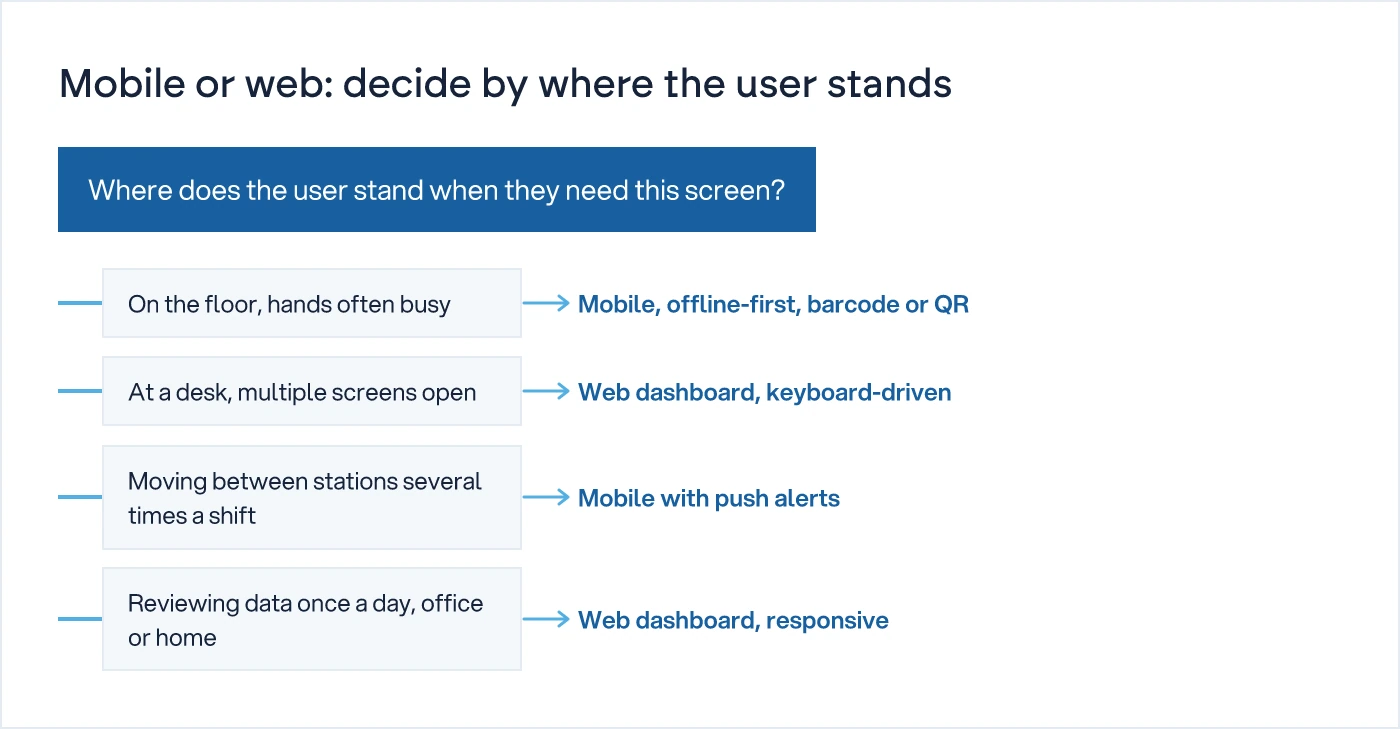
Where does the user actually stand when they need this screen?
This is the only question that matters at the start. Everything else, including your stack choice, follows from it.
Walk the floor with the list of roles who will use the tool. For each one, note three things: where their feet are most of the shift, whether their hands are free when the decision point comes up, and how often in a shift they need this screen. A machine operator scanning a job card does it standing at the machine, hands briefly free, multiple times an hour. A production planner building next week's schedule does it sitting down, once or twice a day, with a keyboard and two monitors open.
Those two people cannot share the same interface and both be well served. Not because of screen size. Because the physical context of the decision is different.
What breaks when you force a web dashboard onto someone walking the floor?
Adoption breaks first, then data quality follows it down. A supervisor who has to find a terminal, log in, click through three screens and type a note will do it less often than the job needs. They will batch updates at the end of the shift, from memory. That is not a training problem. It is the wrong tool for where they stand.
The usual symptom is a dashboard that looks complete but is quietly stale. Stock counts updated at 6pm instead of as each movement happens. Rejection reasons logged an hour after the part left the line, with the detail already fading. The system was built correctly. It was built for the wrong location.
What breaks when you force a mobile app onto someone sitting at a desk?
Speed breaks first. Someone building a weekly production plan needs to see twenty open orders, compare capacity across three lines, and cross-check against last week's actuals, all at once. A phone screen forces that into a sequence of taps and scrolls. What took four minutes on two monitors takes fifteen on a phone, and the planner starts keeping a parallel spreadsheet because the app cannot hold the full picture on one screen.
This is the same mistake in reverse. Mobile-first is not a virtue by itself. It is correct for the floor and wrong for the desk.
Does the same role ever need both?
Yes, and this is where most teams get stuck trying to pick one answer for the whole organisation. A shift supervisor walks the floor most of the shift but also needs to approve a purchase requisition or review yesterday's downtime report at the start of the day. The approval is a desk task even if the supervisor is usually standing. Build the walking tasks mobile and the review tasks web, under the same login, rather than cramming both into one interface that serves neither well.
The table below is a starting point, not a universal answer. Walk your own floor and adjust it role by role.
| Role | Where they stand | Primary task | Best fit |
|---|---|---|---|
| Machine operator | At the machine, hands often on the part | Log start/stop, scan job card | Mobile or fixed tablet, offline-capable |
| Shift supervisor | Walking between stations | Approve exceptions, reassign work | Mobile, with push alerts |
| Store/warehouse staff | Moving between racks | Pick, putaway, stock count | Mobile with barcode scan |
| Quality inspector | At the inspection station | Record defects, attach photos | Mobile |
| Production planner | At a desk | Build weekly plan, check capacity | Web dashboard |
| Plant head / owner | Office or travelling | Review reports, approve POs | Web, with mobile alerts only |
What should you check before you brief a developer?
Before a single screen is designed, walk the floor with this list. Skipping it is how a business ends up paying twice, once for the wrong build and once for the rebuild.
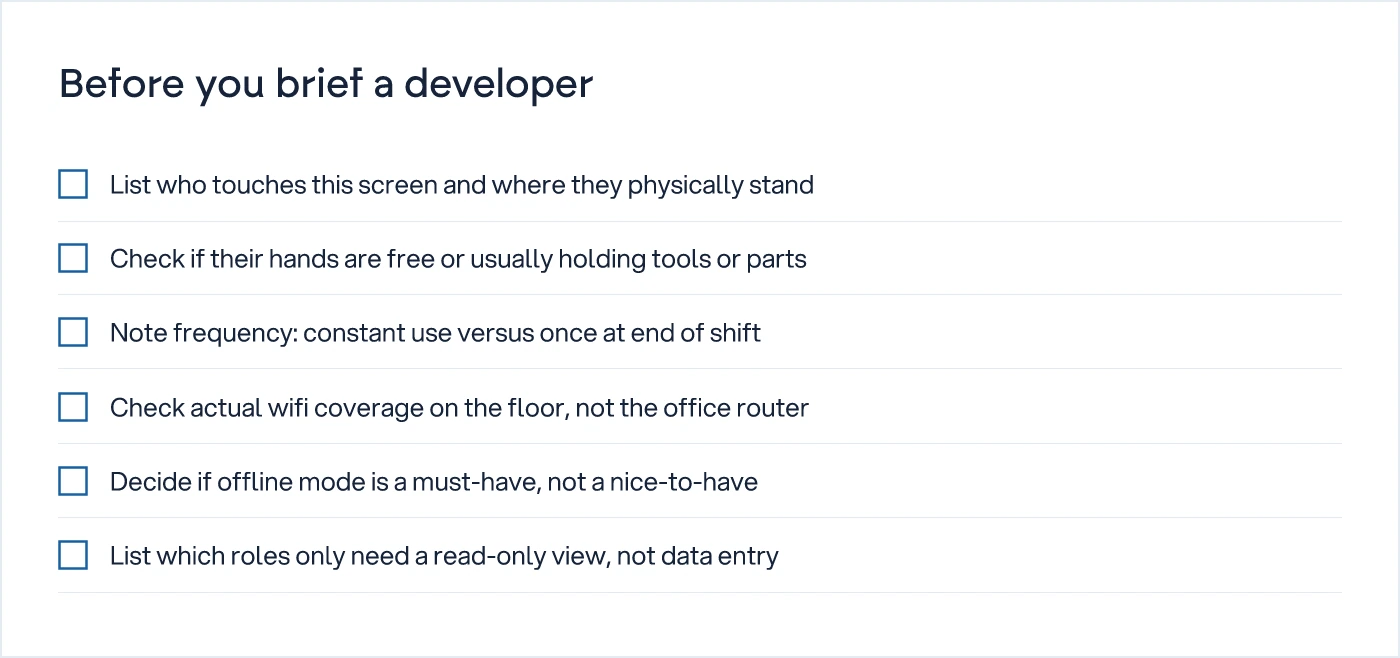
Network coverage is the item teams most often skip, and it is the one that causes the most support calls later. A mobile app that assumes constant wifi on a shop floor with dead zones near the furnace or the loading bay will fail exactly where it matters most. Offline-first is not a technical nice-to-have on the floor. It is the difference between a tool people trust and one they route around.
The same discipline applies once the roles multiply. Role-based access control from the org chart is the right next step once you know who needs mobile, who needs web, and who needs read-only views on either.
Does this decision affect the stack you choose?
Yes, but less than most technical teams assume. A single codebase with a responsive web app plus a native or hybrid mobile shell is standard practice now, and the choice of framework matters less than whether the team you hire can maintain it in three years. That question, and how to weigh it against trends, is covered in how to choose a tech stack when the business has to live with it.
What does matter here is sequencing. Build the floor-facing mobile piece first if your biggest pain today is delayed or missing data from the line. Build the desk-facing web dashboard first if the data already exists somewhere, just not in one place anyone can see. Trying to launch both in one release usually means both ship late and neither gets the floor-testing it needs.
What does getting this wrong cost later?
A wrong device choice rarely surfaces as a bug. It surfaces as a workaround, a parallel spreadsheet, a WhatsApp group that becomes the real system. Six months in, someone asks why the dashboard numbers do not match what actually happened on the floor, and the answer is that the tool was never used the way it was designed to be used, because it was never built for where the user stood.
That gap is exactly the kind of decision debt covered in technical debt in an internal tool: when to pay it down. A mobile-vs-web mismatch is one of the more common sources of it, because it looks like an adoption problem for months before anyone traces it back to the original platform decision.
If your reports are already pulling from more than one system, the device question gets tangled with a reporting question. That is worth separating early, and designing a reporting architecture for a third data source is the companion piece for that specific problem.
What to do next
Walk the floor this week with the role list above in hand. Note where each person's feet are, whether their hands are free, and how often they touch the data. Do not brief a developer on mobile versus web until that list exists. If the answer still needs a phone call to someone on the floor to find out, you are not ready to build either one yet.
For a fuller view of how mobile, web and migration decisions fit together, see the hub on building software: MVP, mobile, web and migration. If you want a second opinion on the device split for your specific floor, our custom software development team can walk it with you.
Common questions
Should we build mobile first or web first for shop floor operations?
Build mobile first if your biggest problem today is missing or delayed data from the floor, such as late job card entries or stock counts done from memory. Build web first if the data already exists but is scattered across spreadsheets and nobody can see it in one place. Sequencing by pain, not by platform trend, avoids a delayed launch on both.
Can one app cover both the shop floor and the office?
Yes, but as one login with two interfaces, not one screen stretched to fit both. A responsive web dashboard for desk tasks and a mobile view for floor tasks, sharing the same data and permissions, serves both groups without forcing either into the wrong format.
Does the shop floor need offline mode in a mobile app?
In most plants, yes. Wifi dead zones near heavy machinery, furnaces or loading bays are common, and a mobile tool that assumes constant connectivity will fail exactly where operators need it most. Build offline-first with sync-on-reconnect rather than adding offline support as an afterthought.
How do we decide which roles get mobile access versus web-only access?
List every role, where they physically stand during their main tasks, and whether their hands are free when they need the screen. Roles that move through the floor with occupied hands need mobile. Roles seated at a desk comparing data or approving requests need web. Some roles, like shift supervisors, need both for different tasks within the same shift.
Is a mobile app always more expensive to build than a web dashboard?
Not necessarily. A simple mobile app with a handful of screens and offline sync can cost less than a data-heavy web dashboard with multiple report views and role-based permissions. Cost depends on the number of screens, the data volume and whether offline support is required, not the platform label itself.
Sources
- Web app or mobile app: decide by where the user is — GESEL.IO
- Web App vs Mobile App — Which to Build First — Hailes Technologies
- Web App vs Mobile App: Which Should Your Business Build First? — Espiolabs

Sanket Vanani
Founder & CEO
Sanket Vanani is a business strategist and entrepreneur focused on helping businesses build structured systems for sustainable growth. His work spans sales, operations, manufacturing, process improvement, and business scalability. Through his experience working closely with business owners and teams, Sanket focuses on turning founder-dependent businesses into process-driven organizations that can grow with greater clarity, consistency, and control.
Related reading
Designing a Reporting Architecture for Multiple Sources
Decision criteria for technical leads: when direct database queries are still fine, and when you need a dedicated reporting layer instead.
Technical Debt in an Internal Tool: When to Pay It Down
Technical debt in an internal ops tool is decision-capability debt. Price it, prioritise it, and pay it down without stopping the business.
How to Choose a Tech Stack When the Business Has to Live With It
Stack choice isn't about frameworks. It's about who can maintain the system after the developer who built it leaves.
Role-Based Access Is Not a Feature, It's Your Org Chart
Generic admin/user roles cause permission sprawl at scale. Map access from real approval authority instead, before writing permission code.


