
Role-Based Access Is Not a Feature, It's Your Org Chart
Design access control by listing every approval that happens in the business today, who makes it, what information they need to decide, and who covers for them when absent. That list is your permission model. Admin and user roles copied from another system will not match how your business actually approves things.
Every internal tool starts with two roles: admin and user. Six months in, someone needs to approve purchase orders but not edit the vendor master. Someone else needs to see all locations but approve none. A third person needs everything the admin has, except the ability to delete records. By the time a team hits three locations and twenty users, the system has eleven roles, four of them created for one person, and nobody remembers why the warehouse supervisor in Pune can approve credit notes.
This is permission sprawl, and it is not a coding problem. It is what happens when access control is built from a technical default instead of from how the business actually approves things.
What is role-based access control and why do admin/user roles fail?
Role-based access control (RBAC) restricts what a user can see and do based on the role assigned to them, rather than granting permissions to each person individually. The failure is not RBAC itself. The failure is starting with generic roles like admin, manager, and user, which describe seniority, not authority.
A business does not run on seniority. It runs on decisions: who approves a purchase order above a certain value, who can override a credit hold, who signs off on a rework, who can see margin data and who cannot. Two people with the same job title in two different plants often have different approval limits, because one plant has a general manager who delegates more and one does not. Generic roles cannot carry that distinction. Approval-based roles can, because they are built from the decision itself, not the designation on the visiting card.
IBM's implementation guide makes the same point from the security side: RBAC works when roles map to job function and the principle of least privilege, not when they are copied from a template.
How do you map roles from actual approval authority?
Before any permission code is written, list every decision in the business that currently needs a person's judgement or signature, on paper or in email. For each one, record four things: what is being decided, who decides it today, what information they look at before deciding, and who decides it when that person is on leave.
This list, not a feature list, is the source of your role model. A purchase order approval above $5,000 (₹4 lakh) is not "manager access." It is a specific permission, tied to a specific threshold, that may sit with the plant head in one location and the finance controller in another. Build the role around that permission, then assign people to it. Do not build the role around the person and hope the permission follows.
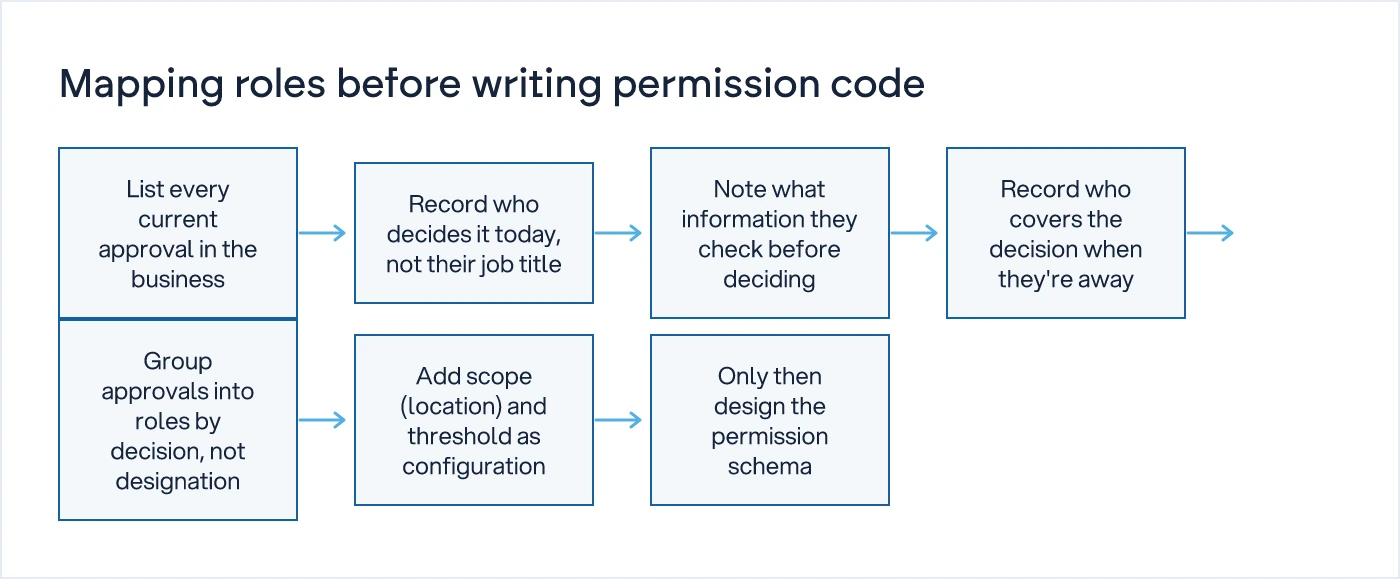
Run this mapping exercise with the person who currently signs off, not with IT and not with the owner alone. The plant head knows that the shift supervisor can approve a stock transfer up to a limit but not a vendor change. That distinction will not appear in an org chart, and it will not appear in a requirements document unless someone asks the person doing the approving today.
This is also where you catch a process that should not be automated at all. If an approval exists only because someone once demanded visibility and nobody has removed it since, digitising it preserves a bottleneck instead of removing one. We understand how your business actually works first, then we design the system, and that includes deciding which approvals deserve to survive.
What is permission sprawl and how does it start?
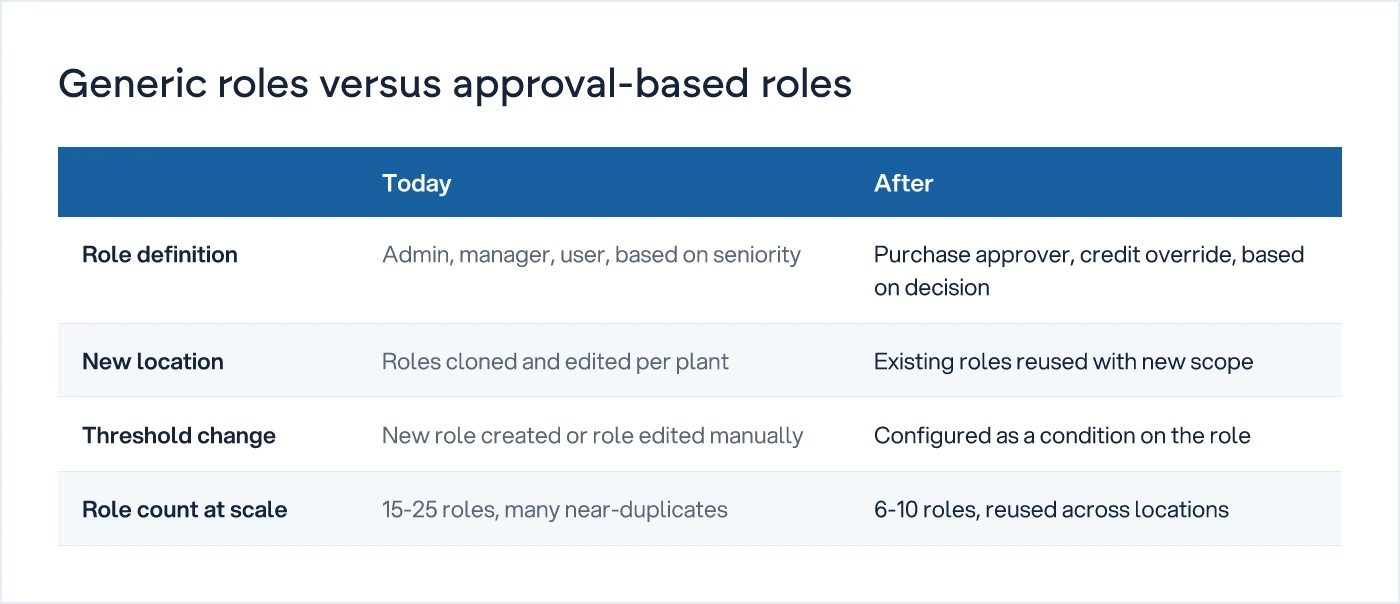
Permission sprawl is what happens when every exception gets its own role instead of its own condition. It starts small. The finance head needs to see reports but not edit ledgers, so someone creates a "finance-view" role. A new plant opens and needs its own approval chain, so someone clones the existing roles and edits three permissions in each clone. Eighteen months later, there are role sets that differ from each other by one checkbox, and nobody can say with confidence what changing that checkbox affects downstream.
Cadence's RBAC design guide describes this as the gap between role count and permission count: when the number of roles grows faster than the number of distinct business functions, the model has already drifted from reality.
The fix is not fewer roles for their own sake. It is separating role (what function this person performs) from scope (which location, plant, or business unit this applies to) and from condition (thresholds, dates, exceptions). A single "purchase approver" role, applied with different scope and threshold per person, replaces a dozen near-identical roles.
| Generic role model | Approval-based role model | |
|---|---|---|
| Role is defined by | Job title or seniority | The specific decision it authorises |
| New location opens | New set of roles cloned and edited | Existing roles applied with new scope |
| Threshold changes ($ or ₹ limit) | Requires a new role or manual edit per user | Configured as a condition on the existing role |
| Auditing "who can approve X" | Requires checking each role individually | Answered directly from the role definition |
| Typical role count at 3 locations, 50 users | 15-25, many near-duplicates | 6-10, reused with scope |
Nirajkumar's enterprise RBAC architecture writeup covers the database side of this separation, role, scope and permission as distinct tables rather than one flat role-to-permission map, which is worth reading once the mapping above is done and you are ready to design the schema.
How do you handle delegation and exceptions without breaking the model?
Build delegation as a rule, not as a shared login. Every approval you mapped in the first exercise should already have an answer to "who decides this when the usual person is unavailable." That answer belongs in the system as a defined backup approver with the same scope and threshold as the primary, not as a password someone hands over when they go on leave.
If the honest answer to "who approves this when the plant head is travelling" is "we call him," you have found a gap in the process, not a gap in the software. If the answer needs a phone call, it's not a system. Fix the delegation rule before you build the screen for it.
Exception handling works the same way. A one-time override of a credit hold should be logged as an exception against a role, with a reason, not created by quietly editing someone's permissions and forgetting to edit them back. Every RBAC model breaks down at the point where an exception becomes a permanent, undocumented permission. That is exactly how the eleven-role sprawl above gets started.
How do you design RBAC across multiple locations without duplicating roles?
Use scope as a separate dimension from role, so the same role definition applies at every location with different limits attached. A "stock transfer approver" role exists once. Its threshold and the warehouses it applies to are configured per assignment, not baked into a location-specific copy of the role.
This matters most during expansion or during an ERP migration, when a new plant needs to be live on day one without someone re-deriving the entire permission structure from scratch. If you are running old and new systems in parallel during a migration, as described in migrating off a legacy ERP without stopping the shop floor, the same role-scope separation lets you extend existing roles to the new plant instead of maintaining two parallel role sets during the transition.
Should you use RBAC or attribute-based access control (ABAC)?
Use RBAC when access depends on job function and threshold, which covers most internal operations tools. Use ABAC, where access is computed from attributes like department, location, and time, only when the number of conditions genuinely cannot be expressed as a manageable set of roles with scope. Ridiculous Engineering's RBAC blueprint makes the case that most teams reach for ABAC too early, when a well-scoped RBAC model with a handful of roles and a scope dimension would have handled the same requirement with far less to maintain. Start with RBAC. Move to ABAC only when you can name the specific rule RBAC cannot express.
When should you design roles relative to scoping the tool?
Scope the tool first, using the same approval list, then let the role design follow from it. How to scope an MVP for an internal operations tool covers how to size the build around the decisions it removes from someone's daily judgement, which is the same list you will use to define roles once the build starts.
What should you do before the next sprint?
Build the approval list before writing a line of permission code. Do not open your ticketing tool and start listing permissions by screen. Sit with the plant head, the finance controller, and one location manager, and build the approval list described above: what is decided, who decides it, what they need to see, who backs them up. That list becomes your roles. The scope and threshold become configuration, not new roles. Everything after that is schema design, and it will hold up as you add locations instead of multiplying roles every time one does.
If you are rebuilding an internal tool and the role model has already sprawled past the point of a quick fix, that is a conversation worth having before more permission code gets written. See how we approach custom software development, or browse the rest of the building software hub for related decisions on scoping, migration, and rollout.
Common questions
What is the difference between RBAC and generic admin/user roles?
Generic admin/user roles are based on seniority or job title. RBAC done properly is based on the specific decisions a role is authorised to make, such as approving a purchase order above a set value. The difference matters at scale: seniority-based roles multiply into near-duplicates as locations and exceptions grow, while decision-based roles can be reused with different scope and thresholds per person.
How many roles should a business application have?
Fewer than most teams assume. Most businesses with a handful of locations and fifty or so users can run on six to ten roles if role, scope, and threshold are kept as separate dimensions. If you have more roles than distinct decisions in the business, the roles have likely been cloned for individuals rather than functions, and that is worth unwinding before adding more.
How do you handle a user who needs permissions from two different roles?
Assign both roles rather than creating a third, combined role. A user with dual responsibilities, such as a plant head who also approves finance exceptions during a vacancy, should hold both role assignments with their own scope and threshold. Creating a merged role for this one case is exactly how permission sprawl begins.
Should approval thresholds be hardcoded into a role?
No. Thresholds change with business size, currency, and location, and hardcoding them into the role definition means every change requires editing code or duplicating roles. Store the threshold as configuration attached to the role assignment, so a finance head can adjust a $5,000 limit to $8,000 without a development request.
What is the first thing to do before designing RBAC for an internal tool?
List every current approval in the business on paper: what is decided, who decides it today, what information they need to decide it, and who backs them up in their absence. This list, built from conversations with the people who actually approve things, is the source of your role model. Skipping this step and starting with a role list from another system is the most common cause of permission sprawl.
Sources
- Role-Based Access Control Design: A Practical Blueprint — Ridiculous Engineering
- How to design role-based access control (RBAC) — Cadence
- Enterprise RBAC System Design: Architecture, Database & Security — Niraj Kumar
- Role-Based Access Control (RBAC) Implementation Guide — IBM

Sanket Vanani
Founder & CEO
Sanket Vanani is a business strategist and entrepreneur focused on helping businesses build structured systems for sustainable growth. His work spans sales, operations, manufacturing, process improvement, and business scalability. Through his experience working closely with business owners and teams, Sanket focuses on turning founder-dependent businesses into process-driven organizations that can grow with greater clarity, consistency, and control.
Related reading
How to Scope an MVP for an Internal Operations Tool
Internal MVPs succeed or fail on the decisions they remove from daily judgement, not the features they ship. Here's how to scope one properly.
Migrating Off a Legacy ERP Without Stopping the Shop Floor
A phased, parallel-run approach to ERP migration that keeps production running while the old system is retired in stages, not overnight.


