
Migrating Off a Legacy ERP Without Stopping the Shop Floor
Run the new ERP alongside the old one for a defined period, module by module or plant by plant, instead of switching everything overnight. Production keeps using the legacy system as the system of record until each area is verified on the new one. The cutover happens in stages the floor can absorb, not in a single weekend.
The real problem isn't the data. It's the plant that can't stop.
Most ERP migration guides spend their time on data mapping, schema conversion and cleansing rules. That work matters, but it isn't what keeps a technical lead up at night when the client is a manufacturer. What keeps them up is this: the plant runs three shifts, the warehouse ships every day, and there is no maintenance window long enough to switch systems without someone on the floor picking up a phone to ask why the scanner isn't printing a pick list.
This is the part most technical guides skip. Data migration is a solved problem with known techniques. Operational continuity during the switch is not a technique, it's a sequencing decision, and it has to be made by the technical lead in the room with the plant head, not designed in isolation and handed down.
What does "no downtime" actually mean on a shop floor?
It means the people entering goods receipts, releasing work orders and printing invoices never have a day where neither system reliably does the job. It does not mean the new ERP is live everywhere from day one.
A plant head does not care which system is "live." They care whether the second shift can raise a material requisition at 11pcm and get it fulfilled by the morning shift. If the new ERP can't yet do that reliably, the old one has to keep doing it, in parallel, until it can. This is the entire premise of a parallel run: the legacy system stays the system of record for a defined scope until the new one has proven itself on real transactions, not test data.
What is a parallel run and when does it make sense?
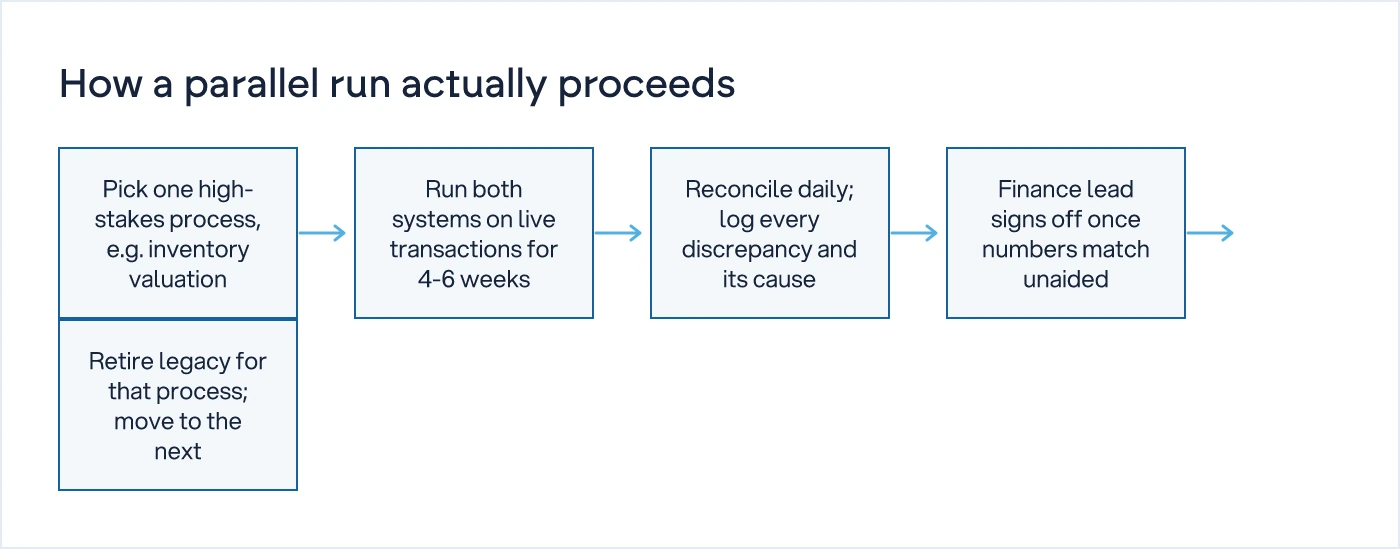
A parallel run means both systems process the same live transactions for a set period, and someone reconciles the output daily until the new system's numbers match the old one without manual correction.
It makes sense when the process being replaced is financially or operationally critical enough that a wrong number has consequences the business cannot absorb: inventory valuation, GST-compliant invoicing, payroll-linked attendance, or any process a bank or auditor will ask about. It is expensive in people-hours, because someone is doing the work twice for weeks. That cost is the price of trust. Skip the parallel run on a high-stakes process and you find out about the gap when a customer complains about a wrong invoice, not when a tester flags it.
Parallel running everything is also a mistake. It doubles the workload of every department at once and burns out the team that has to keep both systems fed. The decision the technical lead and plant head need to make together is which processes get a parallel run and which get a straight phased cutover with a rollback plan instead.
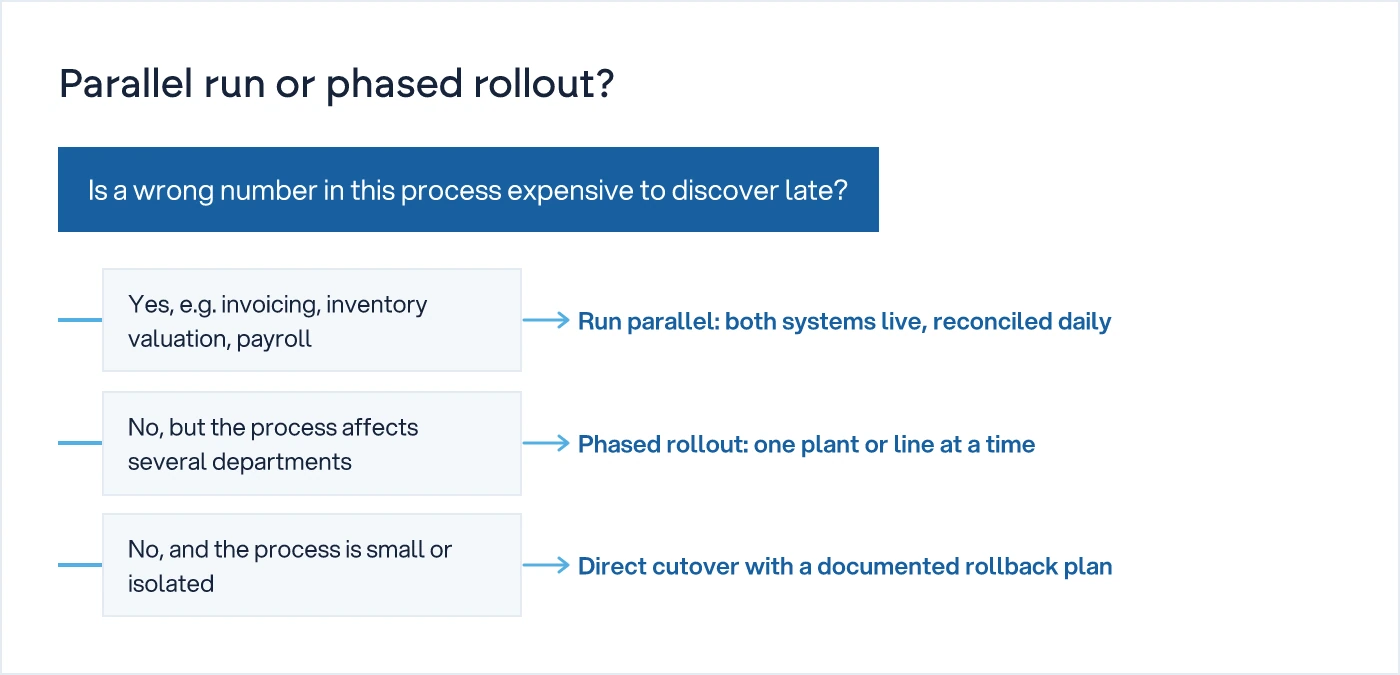
How do you decide between parallel run and phased rollout?
Use parallel running for the processes where a wrong number is expensive to discover late, and use phased rollout for everything else, moving one plant, one process, or one product line at a time.
Phased rollout means the new ERP goes fully live for a defined slice of the business while the rest continues on legacy. A common sequence for a multi-plant manufacturer: pilot plant first, usually the smallest or the one with the most cooperative plant head, then the next plant once the pilot has run a full month-end close cleanly. Inside each plant, sequence by process, not by department: inventory and production first, because everything downstream depends on accurate stock and job status; finance and invoicing next, once inventory numbers are trusted; payroll and HR last, because it touches the fewest people and has the least tolerance for error mid-migration.
What breaks most often during the transition period?
The most common failure isn't a data error. It's a person who doesn't know which system is authoritative for their task that day.
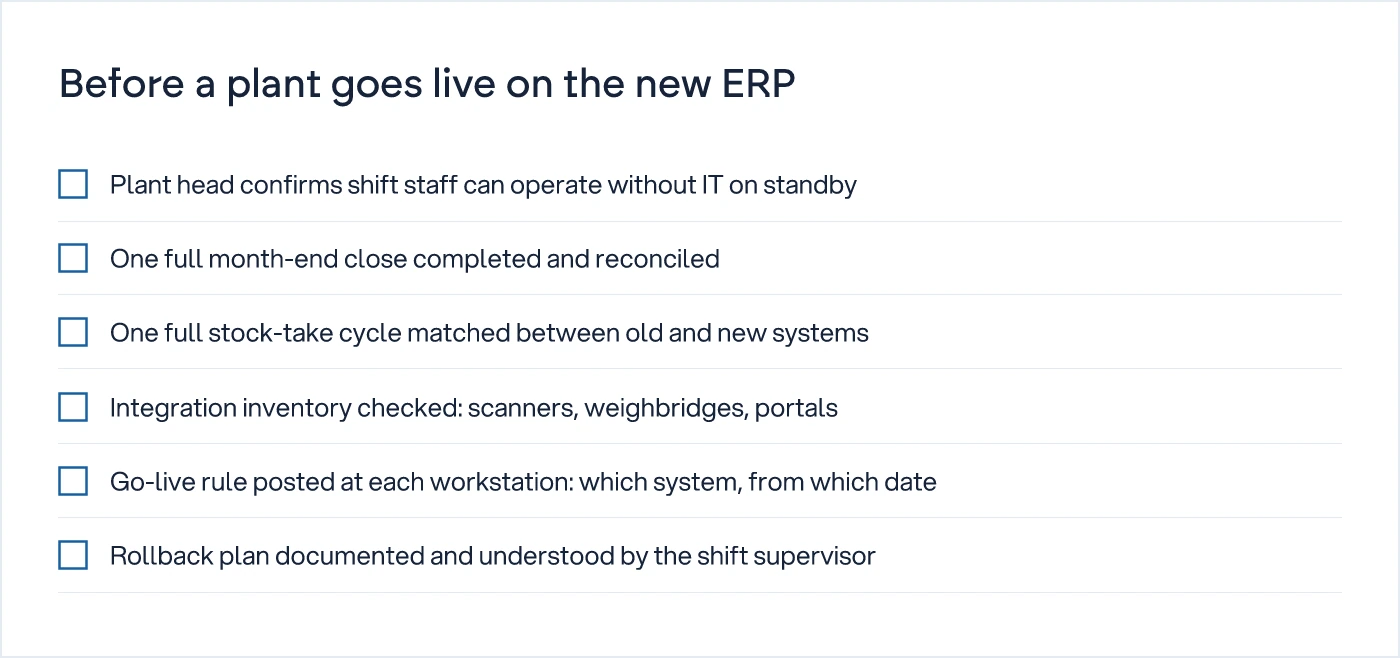
A storekeeper who enters a goods receipt in the old system because that's the habit, while the new system's stock count silently drifts from reality, causes more damage than a bad data migration script. The fix is not more training material. It is a single, visible rule per process: "Inventory entries go in the new system from 1 March. Finance entries stay in the old system until 15 March." That rule needs to be posted at the workstation, not buried in a rollout email nobody reads twice.
The second most common failure is integration drift: a barcode scanner, a weighbridge, or a third-party logistics portal that was wired to the legacy system's API and nobody remembered until the day it stopped sending data. Every phased cutover plan needs an integration inventory before go-live, not after.
| Approach | How it works | Risk to operations | Best suited for | |---|---|---| | Big-bang cutover | Old system switched off, new one goes live everywhere at once | Highest. No fallback if something fails on day one | Small, single-site businesses with simple processes | | Parallel run | Both systems process the same transactions for a defined period, reconciled daily | Low, but expensive in duplicated effort | High-stakes processes: invoicing, inventory valuation, payroll | | Phased rollout | New system goes live for one plant, process or product line at a time | Moderate. Contained blast radius if something breaks | Multi-plant manufacturers, distributors with multiple warehouses |
What does a realistic timeline look like?
For a mid-size manufacturer with two to three plants, expect three to six months from pilot to full cutover, not the six-week timeline a software vendor's sales deck implies.
The pilot plant needs at least one full month-end and one full stock-take cycle on the new system before anyone signs off on rolling to the next site. Compress this and the second plant inherits a bug the pilot didn't have time to surface. This is also why the decision to migrate should not sit with IT alone. The plant head decides when a plant is ready to go live, based on whether their team can run a shift without calling the technical lead. The CFO decides when finance data can be trusted enough to stop the parallel run. IT runs the migration; it does not own the go/no-go call.
Who should be in the room before you write a single line of migration script?
The plant head, the finance lead who owns month-end close, and whoever answers the phone when a scanner doesn't print a label. If the answer to "who decides this is ready" needs a phone call during go-live week, the readiness checklist was incomplete before the project started.
We understand how your business actually works first, then we design the system. That includes the migration sequence itself. A phased plan built around org-chart convenience instead of how stock and cash actually move through the plant will fail in exactly the places a feature list never mentioned.
If you're mapping this out for a growing manufacturing or distribution business, our legacy migration and custom software work starts with the same question every migration should start with: what does each department actually need to keep running on day one, and what can wait until week six. For more on how we approach building and migrating business software, see our hub on building software: MVP, mobile, web and migration.
What to do next
Before any vendor conversation, get the plant head and the finance lead to list every process that would cause a customer complaint, a compliance issue, or a payroll error if it broke for even a day. That list is your parallel-run scope. Everything else is a phased rollout candidate. Write the go-live rule for each process on one page, post it at the workstation, and only then start talking about which system to build.
Common questions
Can you migrate an ERP without any downtime at all?
You can avoid a stoppage in production or shipping, but you cannot avoid downtime in the sense of some manual double-entry and reconciliation work during the transition. The goal of a parallel run or phased rollout is to move that cost to a defined group of people for a defined period, rather than stopping the whole plant for a cutover weekend.
How long should a parallel run last before switching off the legacy system?
Long enough to see at least one full month-end close and one stock-take cycle produce matching numbers on both systems without manual correction. For most manufacturers that is four to six weeks per process. Cutting it shorter to save cost usually means discovering the gap during a live audit instead of during the parallel run.
Which plant or process should go first in a phased rollout?
Start with the smallest plant or the one with the most cooperative plant head, and inside that plant start with inventory and production data, since everything else depends on accurate stock and job status. Finance and payroll should go last, because they have the least tolerance for a mid-migration error.
Who should decide when a plant is ready to go live on the new ERP?
The plant head, not IT. IT can confirm the system is technically functioning, but only the plant head knows whether a shift supervisor can run a full day without calling for help. Finance sign-off from the CFO or controller is a separate, equally necessary decision before the parallel run ends.
What causes most ERP migrations to disrupt operations even with a phased plan?
Two things: nobody defines which system is authoritative for a given task on a given date, so staff enter data in the wrong place out of habit, and integrations to scanners, weighbridges or logistics portals get missed because they were wired to the old system and nobody built an integration inventory before go-live.
Sources
- Legacy ERP Cloud Migration Without Downtime: Playbook — Codenicely
- Zero-Downtime ERP Migration: Replace Without Stopping — PHX Consultants

Sanket Vanani
Founder & CEO
Sanket Vanani is a business strategist and entrepreneur focused on helping businesses build structured systems for sustainable growth. His work spans sales, operations, manufacturing, process improvement, and business scalability. Through his experience working closely with business owners and teams, Sanket focuses on turning founder-dependent businesses into process-driven organizations that can grow with greater clarity, consistency, and control.
Related reading
How to Choose the Right ERP Integration Pattern
A technical framework for choosing between API-first, event-driven and batch sync when connecting ERP, CRM and shop floor systems.
Simple ERP System for Small Business: What to Fix First
A simple ERP only stays simple if the process behind it is clear. Fix the process first, then pick the lightest cloud tool that fits.
Kaizen for Small Factories: Start It, Make It Stick
Kaizen fades without daily numbers. A 30-day plan, the metrics to track, and why most 5S boards go quiet after month one.


