
Workflow Automation for Small Business: 10 Workflows to Fix
Workflow automation is software that handles the repetitive steps in a process, like routing approvals, sending reminders and raising alerts, so people only step in to decide. Fix the process on paper first. Start with the workflow that generates the most chasing and follow-up calls, not the one that looks easiest to automate.
What Is Workflow Automation, and Why Fix the Process First?
Workflow automation is software that handles the repetitive steps in a process, so a person only steps in to make the decision. A quote moves from sales to the manager's inbox without anyone typing an email. A stock level drops below the reorder point and a purchase request appears, instead of someone noticing three days late.
That is the mechanical definition. The harder part is this: workflow automation for small business only works if the process underneath it makes sense. If five people sign off on a purchase order under $200, automating that chain just makes the approval faster to ignore. We covered this in detail in Automate the Approval Process or Redesign It First?. Fix the process first. Automate it second.
Most small business automation projects fail for a simple reason. Someone maps the software onto the current mess instead of asking who should decide, what information they need, and where the delay actually sits.
Below are ten workflows that cause the most hours lost to chasing, in businesses of roughly 10 to 100 people, across manufacturing, trading, distribution and services. Each one covers what it is, why it costs you time, and what to fix before you touch any tool.
1. Quote Approval
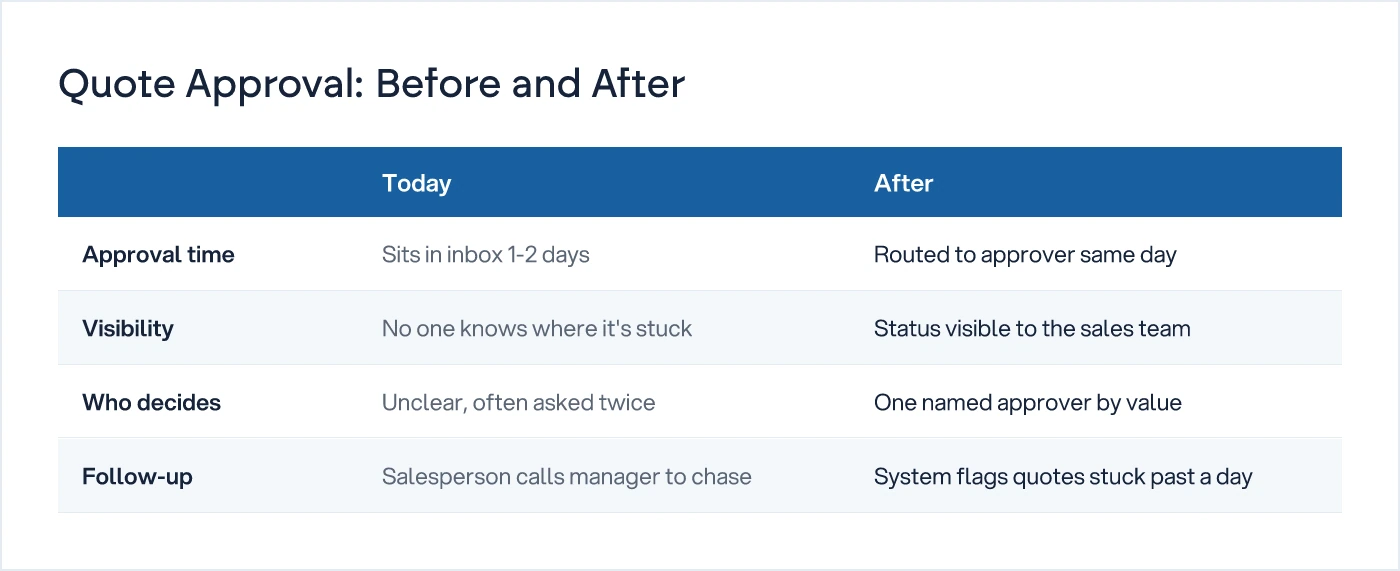
A salesperson prepares a price, a manager checks the margin, and the quote goes out. When approval lives in email or on paper, quotes sit in someone's inbox for a day or two while the customer calls a competitor.
Fix it: set one clear rule for who approves what value, route the quote straight to that person, and make it visible to the sales team where every quote is stuck.
2. Order Entry
A customer order gets typed into the system from a phone call, an email or a message. Manual retyping is where wrong quantities, wrong prices and missed delivery dates start.
Fix it: capture the order once, at the point it is confirmed, and let it flow straight into production and dispatch without a second entry step.
3. Purchase Request
Someone in stores or on the shop floor asks for material, and someone else approves the spend. When this runs on paper or in a group chat, nobody can see how many requests are pending or how old the oldest one is.
Fix it: give every request a status, raised, approved, ordered, received, and make that status visible to whoever is waiting on it.
4. Dispatch Update
Telling a customer, or your own sales team, that an order has shipped. Without this, your sales team spends the first hour of every day answering "where is my order" instead of selling.
Fix it: trigger the update the moment dispatch is marked complete in your system, not when someone remembers to send a message.
5. Invoice Reminder
Chasing a customer for payment on an overdue invoice. Left to memory, reminders go out late, inconsistently, or not at all, and that shows up directly in your cash flow.
Fix it: set the first reminder to trigger automatically on the due date, with a second one at a fixed interval after, before anyone has to think about it.
6. Leave Approval
An employee asks for time off, a manager approves or declines. On paper forms or verbal requests, two people can be approved for the same shift and nobody notices until the floor is short.
Fix it: route every request to one named approver, show them who else is off that week, and record the decision where payroll can see it.
7. Daily Report
Production, sales or collection numbers reported up to the owner or plant head at the end of the day. When someone has to compile this by phone call or spreadsheet each evening, it either arrives late or stops arriving.
Fix it: pull the numbers automatically from wherever they are entered during the day, and send the summary out at a fixed time.
8. Stock Alert
A warning that a material or product is close to running out. Without one, stockouts get discovered on the day production stops, not three days before.
Fix it: set a reorder point for every item that matters, and let the alert fire on the number, not on someone remembering to check the shelf.
9. Quality Issue
A defect gets flagged on the shop floor or from a customer complaint. Logged in a register, or not logged at all, the same defect keeps recurring because nobody traced it back to the cause.
Fix it: capture the issue where it happens, route it to whoever owns that process step, and keep a record you actually review every month.
10. Customer Onboarding
Everything between a new customer saying yes and their first order going smoothly. Onboarding is where new accounts get lost quietly, usually because three departments each think someone else is handling it.
Fix it: write the steps down, assign one owner per step, and automate the handoff between steps, not the judgment calls inside them.
How Do You Pick Which Workflow to Fix First?
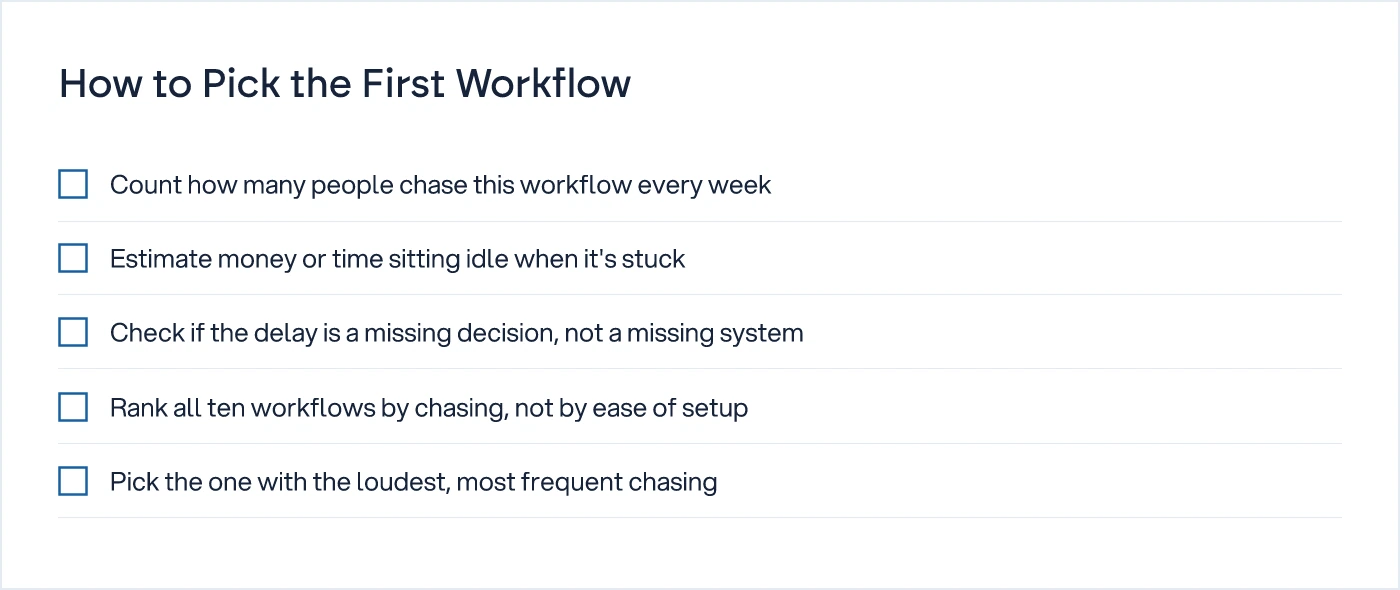
Pick the workflow with the most follow-up calls, not the one with the most clicks.
Ask three questions about each of the ten above. How many people chase this every week. How much money or time sits waiting when it gets stuck. How often is the delay caused by a missing decision rather than a missing system. The workflow that scores highest across all three is your first one.
Do not start with whichever workflow looks easiest to automate. A simple workflow with a low cost of delay will feel like progress and change nothing the owner actually notices. Start where the chasing is loudest.
If you are also weighing whether AI has a role in any of these ten, that is a separate question worth answering properly before spending on it. See The AI Readiness Check Before You Spend on AI.
No-Code vs Custom: Which Workflow Automation Tools Fit a Small Business?
No-code tools fit most of the ten workflows above. Custom development earns its cost only when a workflow is specific to how you run production, pricing or compliance.
No-code platforms let you set up approval chains, reminders and alerts without writing code, and most connect to the accounting or ERP system you already use. They are fast to set up and cheap to change. The limit shows up when a workflow needs logic specific to your business, for instance a quality issue that must route differently depending on which machine it came from.
| Factor | No-code workflow automation tools | Custom-built workflow |
|---|---|---|
| Setup time | Days to a few weeks | Weeks to a few months |
| Best for | Standard workflows: approvals, reminders, alerts | Logic tied to your specific production or pricing rules |
| Change cost | Low, usually self-service | Requires a development request |
| Who maintains it | Office manager or ops lead, after setup | Needs a developer or technical partner |
| Main risk | Outgrowing the tool as rules get more specific | Over-building before the process is proven |
Most businesses in the 10-100 person range are better served starting with no-code tools for eight of the ten workflows above, and reserving custom development for the one or two that are genuinely unique to how they operate. That is the practical shape of business workflow automation at this size: mostly configuration, with custom work only where it earns its cost. This is the groundwork we walk through as part of digital transformation work before any tool gets switched on, and it is covered more broadly on our AI and Automation for Operations hub.
Pick one workflow from the list above. Map it on paper before anyone touches software, naming who decides and what they need to decide it. If that paper map still makes sense once every decision point is drawn out, it is ready to automate.
Common questions
What is workflow automation?
Workflow automation is software that carries out the repetitive steps in a business process automatically, such as routing an approval to the right person, sending a payment reminder, or raising a stock alert. People still make the decisions. The software removes the manual chasing, retyping and status checking around those decisions.
Which workflows should a small business automate first?
Start with the workflow that generates the most chasing each week, not the one that looks simplest to set up. For most businesses with 10 to 100 people, that is quote approval, purchase requests, or invoice reminders, since delays there directly cost sales or cash flow.
Do I need coding for workflow automation?
No. Most of the ten workflows described above can be set up with no-code tools that connect to the accounting or ERP system you already use. Coding, or a custom build, is only worth it when a workflow has logic specific to your production, pricing or compliance rules.
What does workflow automation cost?
It depends entirely on scope: a single no-code reminder or approval chain costs far less than a custom-built workflow tied into your ERP. Get quotes against a written process map, not a feature list, so the cost reflects the actual steps and decisions involved.
Sources
- Workflows Overview — Expedify Documentation
- AI Workflow Automation Platform — Ceven

Sanket Vanani
Founder & CEO
Sanket Vanani is a business strategist and entrepreneur focused on helping businesses build structured systems for sustainable growth. His work spans sales, operations, manufacturing, process improvement, and business scalability. Through his experience working closely with business owners and teams, Sanket focuses on turning founder-dependent businesses into process-driven organizations that can grow with greater clarity, consistency, and control.
Related reading

Automate the Approval Process or Redesign It First?
Workflow tools promise speed. If your approval chain has too many sign-offs, automating it as-is just moves the same delay faster and hides it better.

The AI Readiness Check Before You Spend on AI
Before any AI vendor conversation, check whether you have a named decision and clean data behind it, not just enthusiasm for the idea.


